This guide reads the state of your AZ edge routers in the dashboard’s admin panel and changes what they
carry: which VPCs, which subnets, and which fabric peers. Every step shows the dashboard first, then the
equivalent kubectl command.
An AZ edge router is one FRR gateway per availability zone that connects many tenant VPCs to the upstream network at once. Each VPC it carries gets its own transit interface and its own VRF on the router, so tenants stay isolated while sharing one gateway. Traffic inside a VPC never touches it; only traffic that leaves the VPC does. The AZ Edge Router concept pages explain the design; this guide covers the dashboard.
Before you start
- An administrator account. In OIDC mode that is a user bound to a role with full wildcard rules, such as the built-in admin role, see the Access Control Guide. In basic and none mode every user is the administrator.
- At least one
AZEdgeRouterobject. The dashboard reads and adjusts edge routers, but does not create or delete them: a platform administrator applies the router withkubectl(see the CRD reference), usually in the namespace of the VPCs it serves. Withspec.vpcs.namespacesa router can also carry VPCs of other namespaces whose owners opted in with the labelvirtualization.k8c.io/edge-router-attach=true. - Running KubeV inside a KDP project? Edge routers are not shown there. The platform administrator manages
them on the host cluster with
kubectl.
| Object | Dashboard name | What it is |
|---|---|---|
AZEdgeRouter (routing.virtualization.k8c.io) | Edge Router | One gateway per zone, running as a StatefulSet of FRR pods. |
VPC | VPC | A tenant network. A label on it attaches it to a router. |
Subnet | Subnet | A network inside a VPC. A label on it lets the router advertise it. |
UnderlaySubnet | Underlay subnet | A pre-provisioned VLAN that carries one VPC’s BGP session to the fabric. |
The pages live in the admin panel: choose Admin in the top right of the header, then Network > Edge Routers in the sidebar. The pages refresh on their own every ten seconds.
Step 1: Read the list
The list shows every edge router in the cluster, across all namespaces.
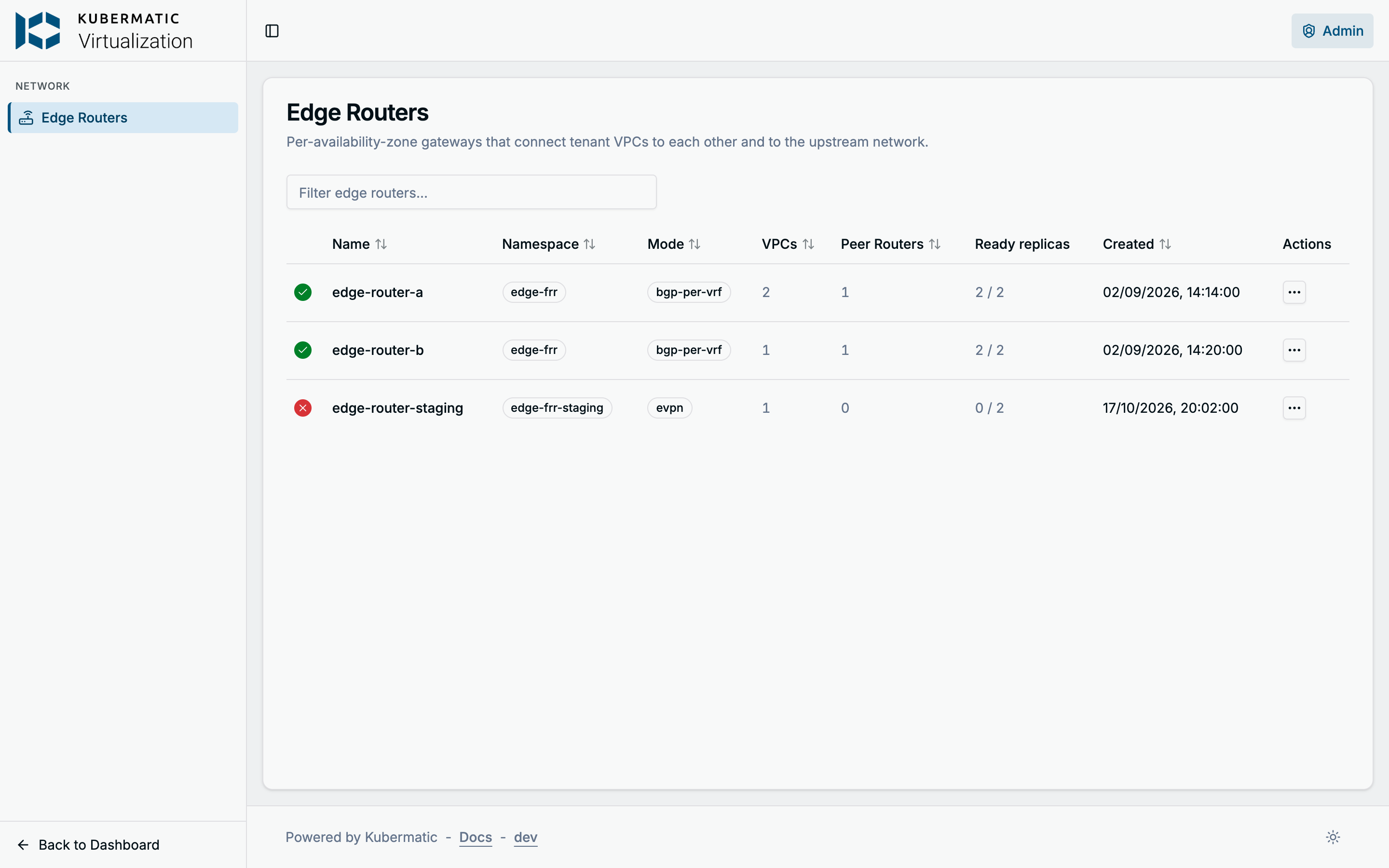
| Column | What it shows |
|---|---|
| Status icon | The router’s Ready condition: a green check when it is True, a red cross when it is False (hover the icon for the condition’s message) or the router is being deleted. A spinner means there is no Ready condition for the router’s current generation yet: blue when some replicas are ready, grey when none. |
| Mode | bgp-per-vrf when spec.ovnTransitMode is set to it, evpn when the router has an ASN, otherwise static. static is the dashboard’s name for a router without an ASN, not a spec value. |
| VPCs | How many VPCs the router has resolved. |
| Peer Routers | How many paired routers it has resolved. |
| Ready replicas | Ready FRR pods out of spec.replicaCount, where 0 counts as the default 2. |
In the screenshot, edge-router-staging is not ready: none of its two replicas is up. The
row’s Actions menu opens the router’s page or its YAML, read-only.
The same with kubectl
kubectl get azedgerouters -A -o wide
The Ready column is the condition, Reason says why it is False, and ReadyReplicas is the first
number of the dashboard’s Ready replicas.
Step 2: Inspect a router
Open a router from the list. The header repeats its status and ready replicas; the tiles below it show the router’s transit mode, ASN, replica, VPC and peer counts, management and transit subnet, transit CIDR, and its router-wide VLAN and service VLAN NADs. YAML shows the whole object, including its status.
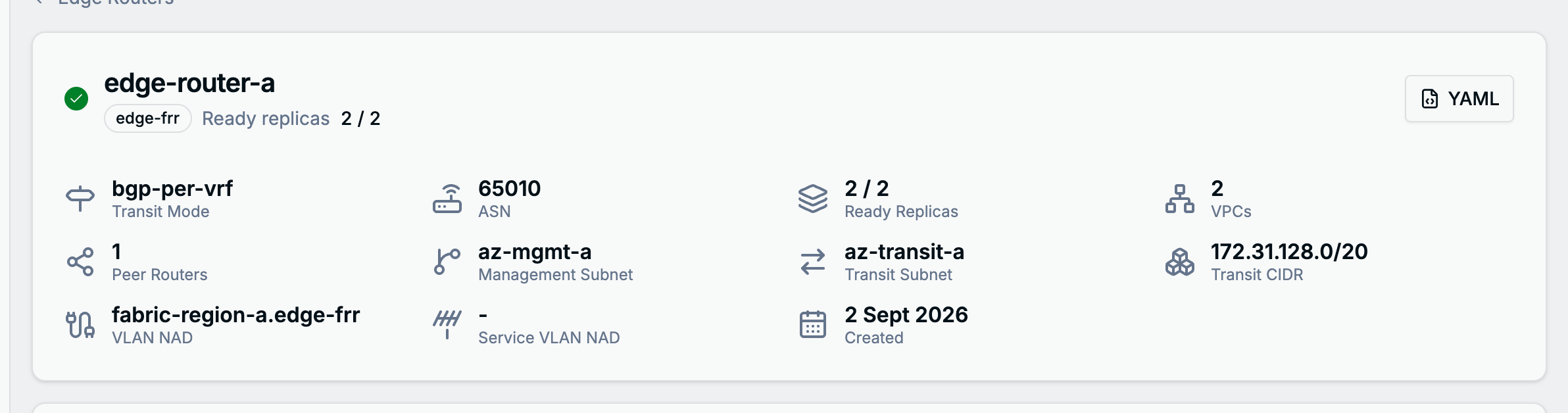
The tabs below, except VPC Attachment (Step 3), read the router’s status.
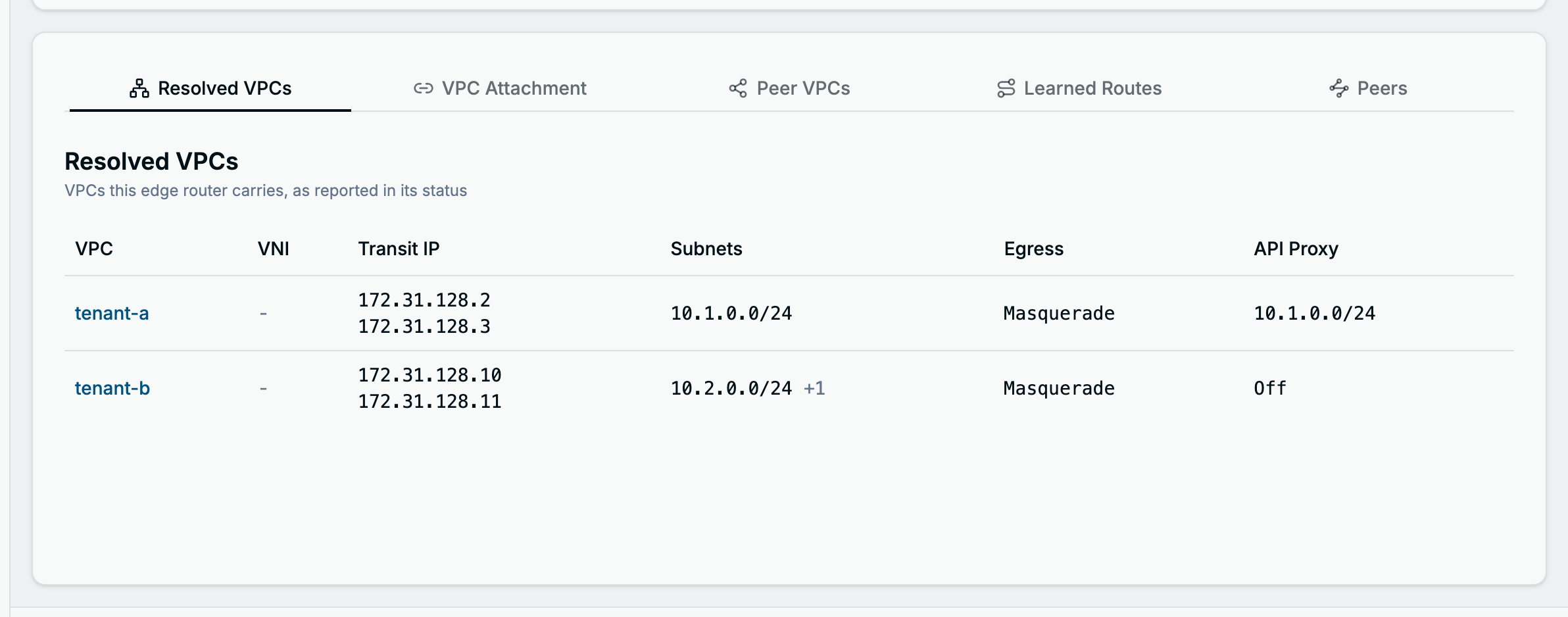
Resolved VPCs
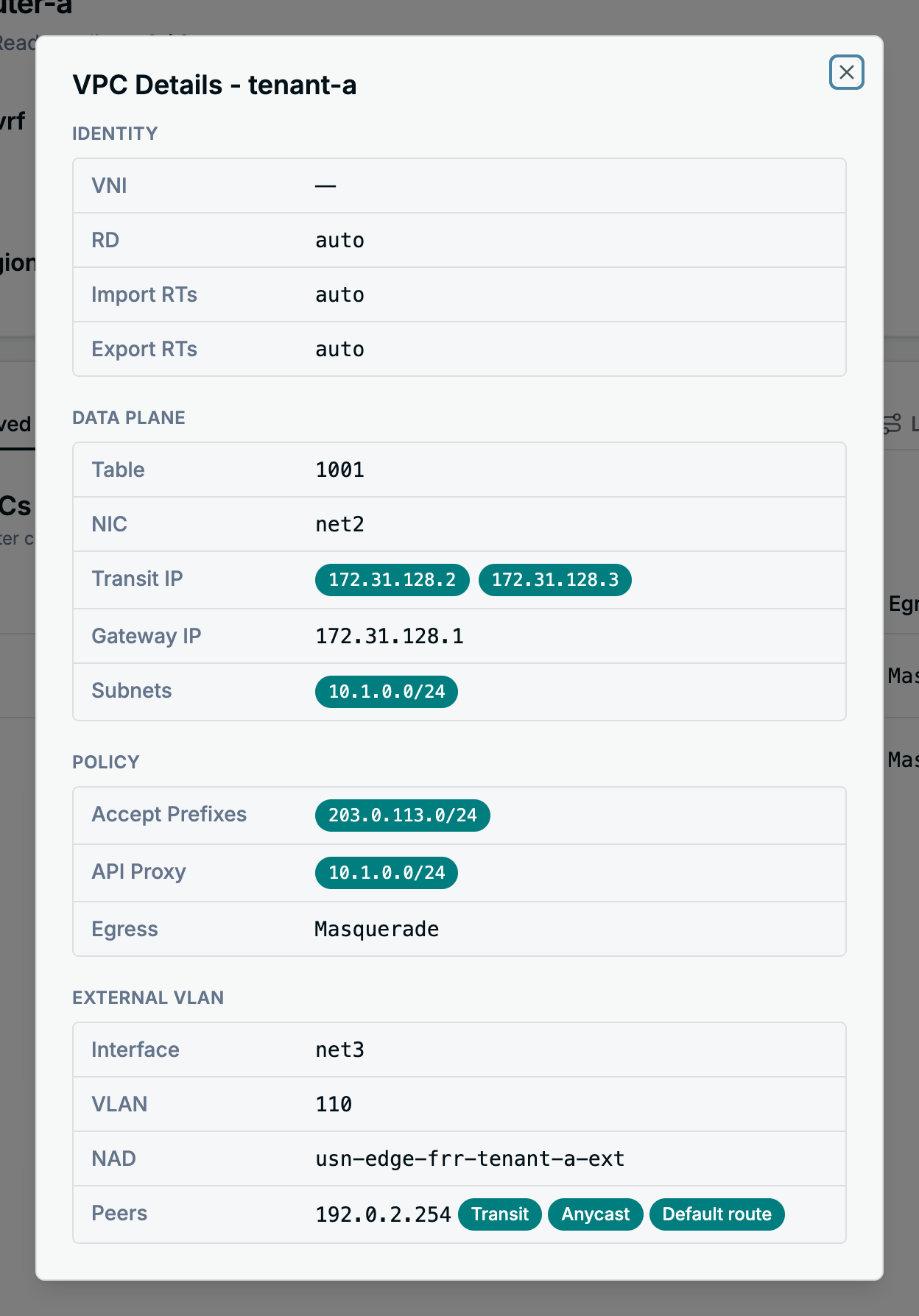
The VPCs the router carries, with each one’s VNI, transit addresses (one per replica), subnets, egress
and API server proxy settings. Open a row for the details the router resolved for that VPC: its routing
table, NIC, gateway, accepted prefixes and, in bgp-per-vrf mode, its external VLAN and fabric peers.
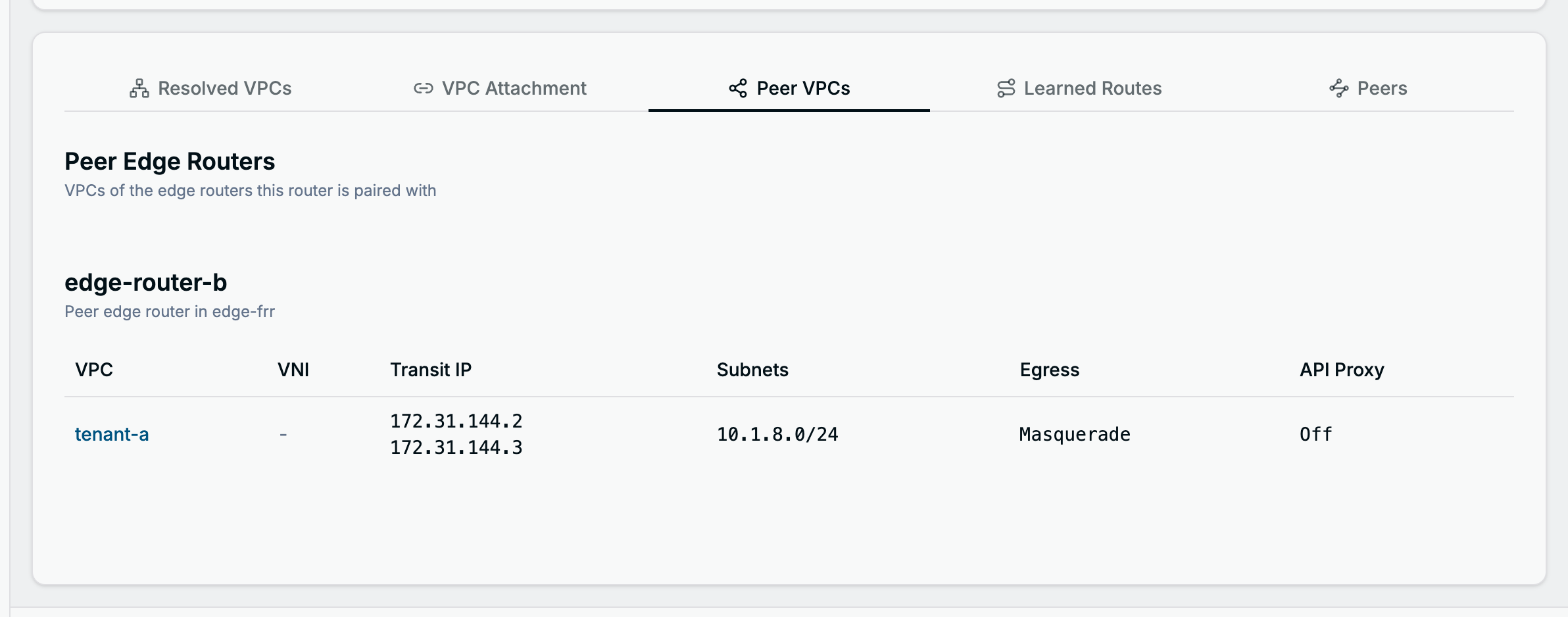
Peer VPCs
The VPCs of the routers named in spec.peerAZEdgeRouters (same namespace), as this router mirrors them
in its status. Those VPCs also get transit interfaces on this router; see
Multi-Region and
Routing Over the Fabric.
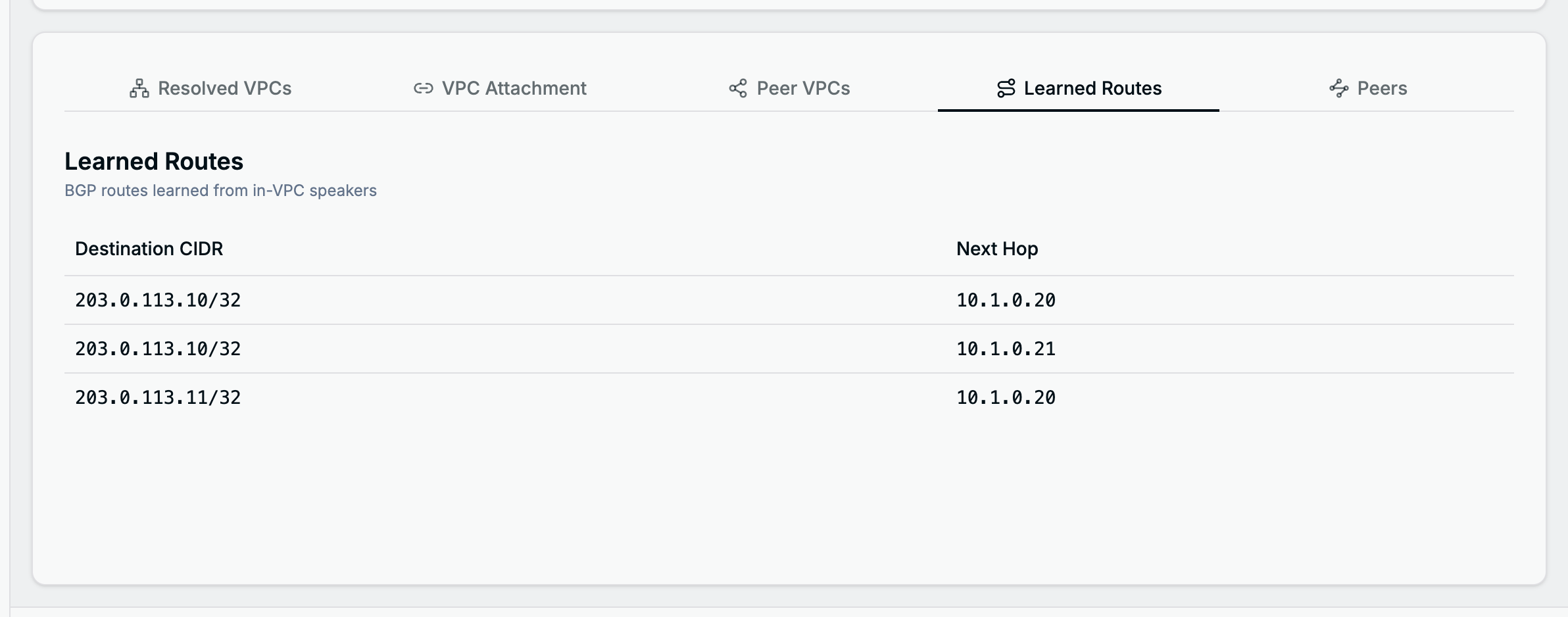
Learned Routes
Prefixes that BGP speakers inside the VPCs, such as MetalLB, advertise to the router, with the next hop of each. See Virtual-IP Plane.
Peers
Everything the router peers with:
- Fabric Peers: the upstream neighbour of each VPC, with the roles it was given (Transit receives the VPC’s subnets, Anycast receives the anycast addresses, Default route carries the VRF’s default route), its BFD setting, and the live BGP session of every replica with the prefixes received and sent. The session state is what FRR reports: green Established is healthy, blue states such as Active or Connect mean the session is still being set up, and a red Idle (…) means the session was torn down, for example by a prefix limit. On a multi-replica router, a replica that has sessions but none with this peer shows no session; a replica that reports no sessions at all is counted below the table.
- In-VPC Speakers: whether speakers inside the VPCs may peer with the router, and the sessions they opened, one per router replica.
- Peer Edge Routers: the paired routers and the subnets they serve.
- Outside
bgp-per-vrfmode also the configured EVPN and BGP peers and the peers discovered through the route reflector.
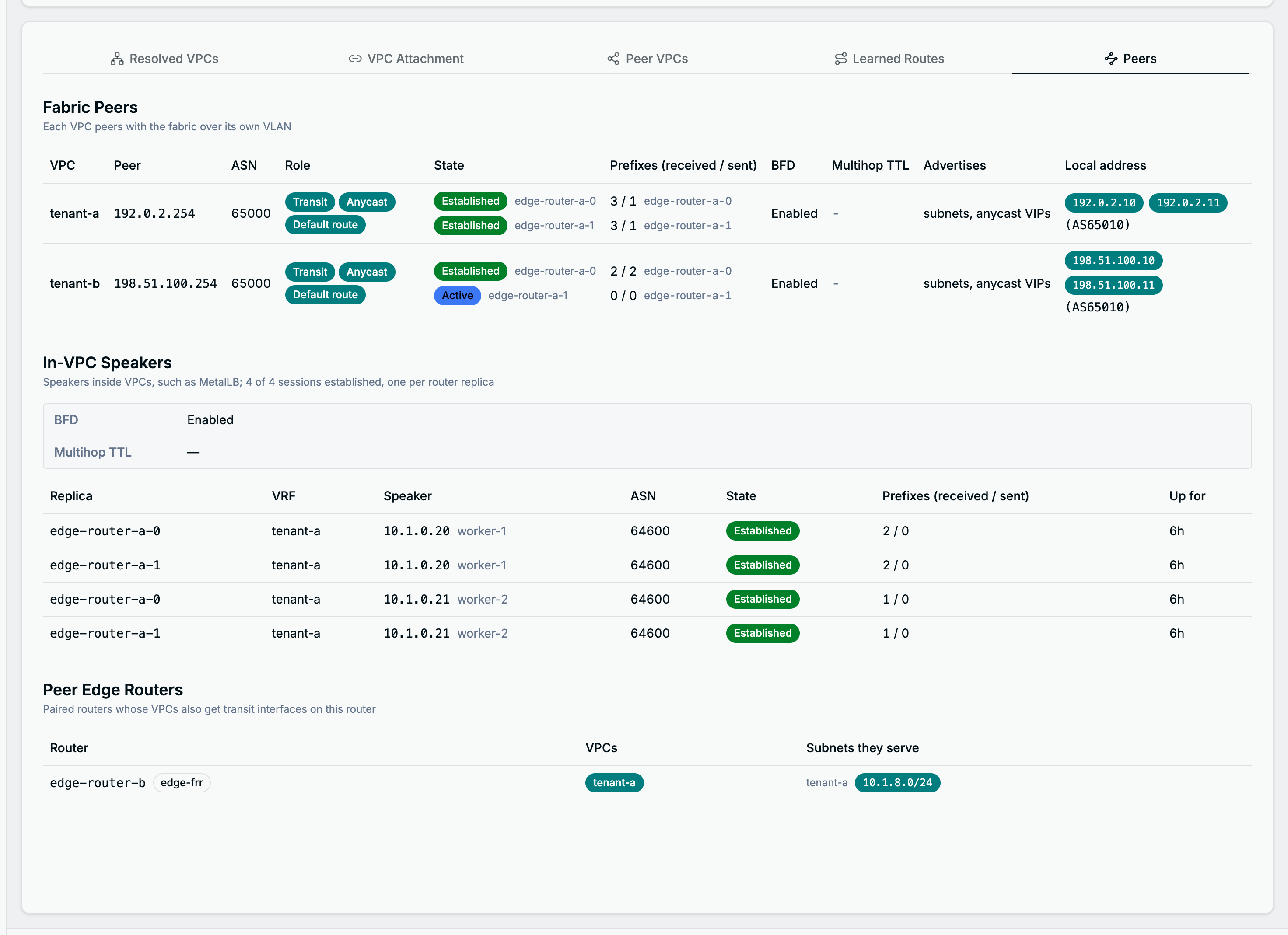
In the screenshot, replica edge-router-a-1 has not established its session with the fabric peer of
tenant-b yet.
The same with kubectl
kubectl -n edge-frr get azedgerouter edge-router-a -o yaml
The tabs map to the status fields resolvedAZVPCs, peerResolvedAZVPCs, learnedBGPRoutes and
bgpSessions. For the condition and the router’s events:
kubectl -n edge-frr get azedgerouter edge-router-a \
  -o jsonpath='{.status.conditions[?(@.type=="Ready")]}'
kubectl -n edge-frr describe azedgerouter edge-router-a
Step 3: Attach or detach a VPC
Open the VPC Attachment tab. Onboarding Mode shows how the router finds its VPCs: by label, with the VPC selector and the subnet selector from its spec, or from an explicit list (see Attaching VPCs and Subnets). The switches below are available for routers that select VPCs by a plain label match. A router with an explicit list shows its VPCs and subnet selection read-only; its external VLANs (Step 5) can still be edited.
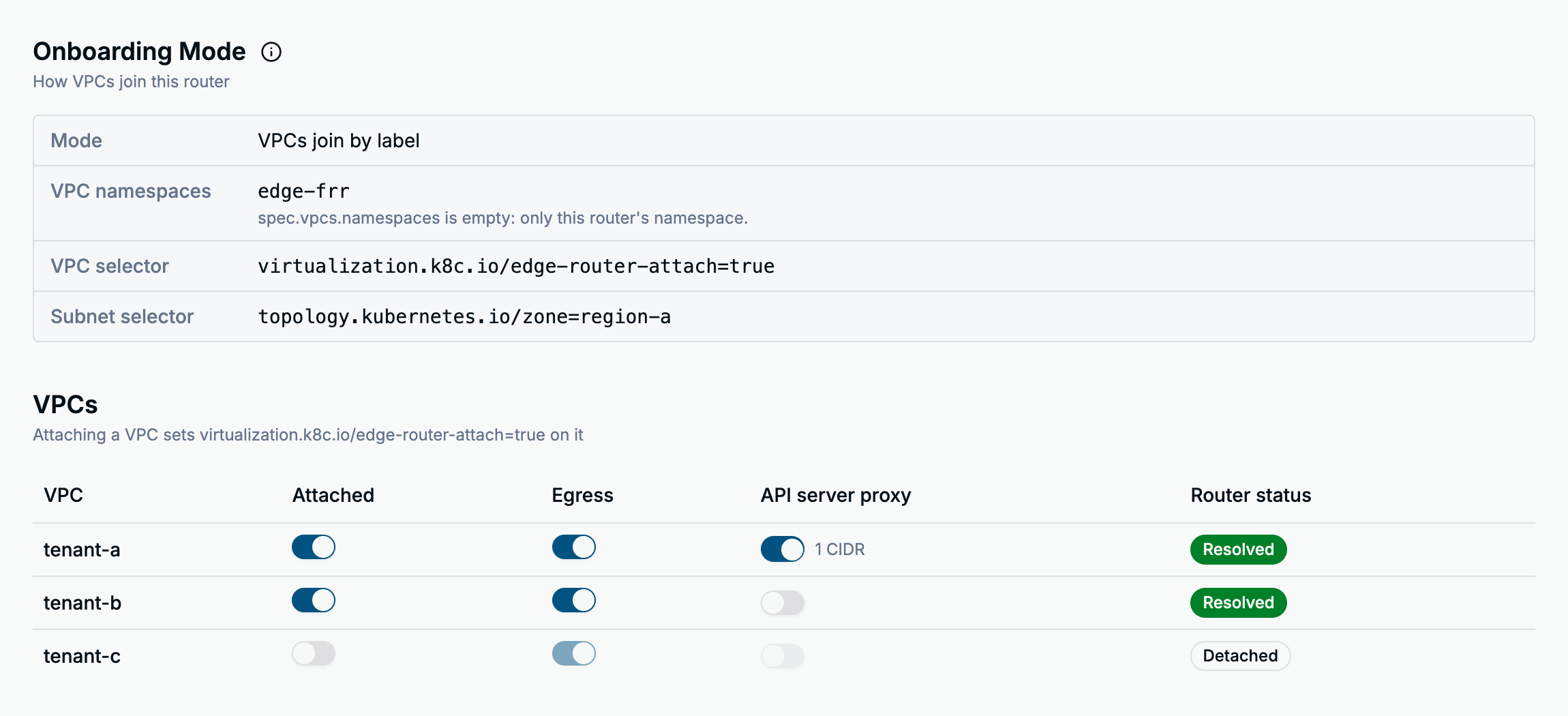
The VPCs table lists every VPC in the router’s namespaces, a VPC from another namespace as
namespace/name. Each row has three switches:
| Switch | What it does |
|---|---|
| Attached | Sets the router’s selector label on the VPC, so the router picks it up on its next reconcile. Router status turns from Pending to Resolved once the router has carried it. Turning it off asks for confirmation, because the VPC’s traffic through the edge stops. |
| Egress | On by default, available once the VPC is attached. Turning it off stops SNAT and egress routing for the VPC, after a confirmation. See Egress Control. |
| API server proxy | Lets the VPC’s workloads reach the infrastructure cluster’s API server through the router, after a confirmation. Only available on routers with spec.apiServerViaInternalProxy set, and once the VPC is attached. Narrow it to single subnets in Step 4. |
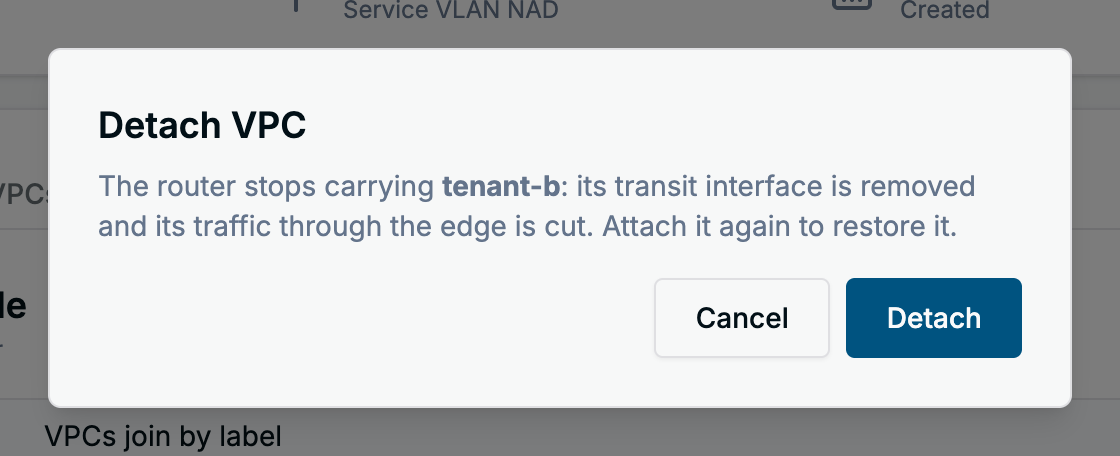
A VPC labelled for another router cannot be attached here: the switch is disabled and its tooltip names the label to remove first. For a VPC from another namespace the router reads only the egress annotation, so the API server proxy switch has no effect there.
The same with kubectl
The switches on this tab write labels and annotations on the VPC, not on the router. The label is the
router’s VPC selector, shown under Onboarding Mode; the example router selects
virtualization.k8c.io/edge-router-attach=true.
# attach, then detach (detaching also clears the proxy annotations)
kubectl -n edge-frr label vpcs.virtualization.k8c.io tenant-c virtualization.k8c.io/edge-router-attach=true
kubectl -n edge-frr label vpcs.virtualization.k8c.io tenant-c virtualization.k8c.io/edge-router-attach- \
  && kubectl -n edge-frr annotate vpcs.virtualization.k8c.io tenant-c \
  az-edge-router.virtualization.k8c.io/apiserver-proxy- az-edge-router.virtualization.k8c.io/apiserver-proxy-subnets-

# egress off, and on again
kubectl -n edge-frr annotate vpcs.virtualization.k8c.io tenant-c az-edge-router.virtualization.k8c.io/egress-enabled=false
kubectl -n edge-frr annotate vpcs.virtualization.k8c.io tenant-c az-edge-router.virtualization.k8c.io/egress-enabled-

# API server proxy for one subnet of the VPC
kubectl -n edge-frr annotate vpcs.virtualization.k8c.io tenant-c \
  az-edge-router.virtualization.k8c.io/apiserver-proxy=true \
  az-edge-router.virtualization.k8c.io/apiserver-proxy-subnets=10.3.0.0/24
Step 4: Choose the advertised subnets
Further down the VPC Attachment tab, Subnet Advertisement lists the subnets of one attached VPC. Pick the VPC, then turn Advertised by this router on or off per subnet. The Zone column shows the label the router looks for; None means the subnet is not advertised, and a value from another router means that router advertises it, so stop it there first.
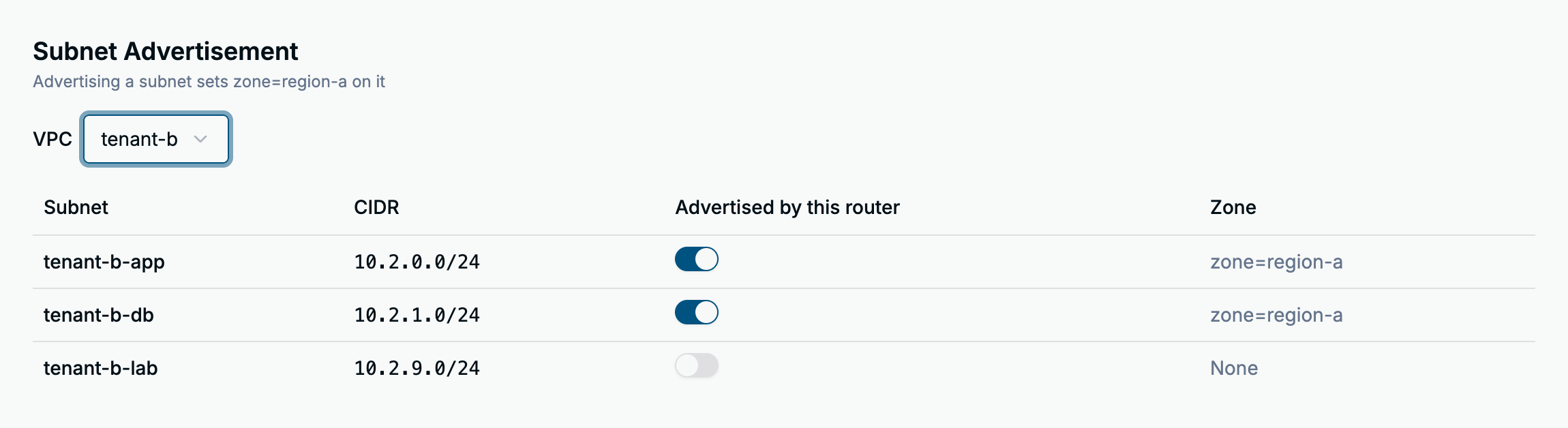
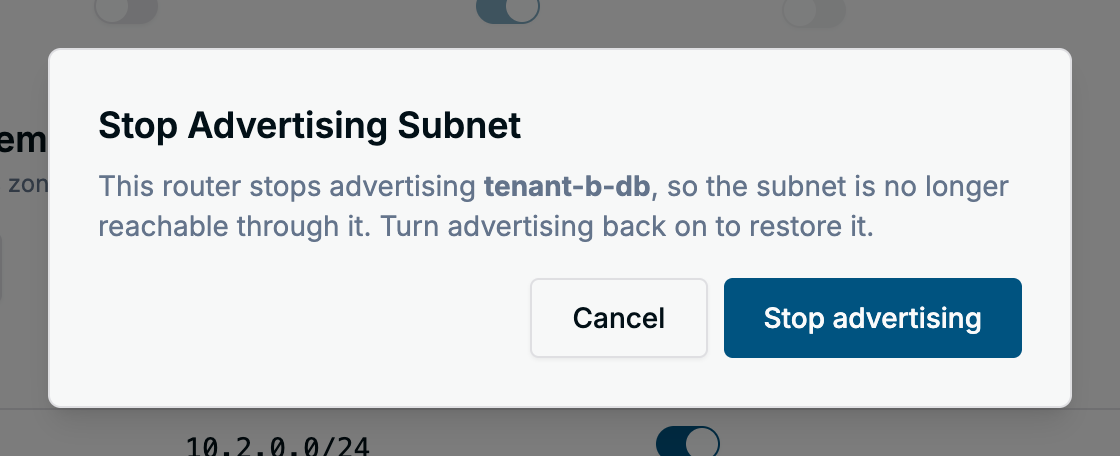
Turning advertisement off asks for confirmation, because the subnet stops being reachable through the router. On a router with an API server proxy, and for a VPC with the proxy switched on, an extra API server proxy column narrows the proxy to single IPv4 subnets; the last allowed subnet cannot be switched off here, turn the proxy off for the VPC instead.
A router whose subnet selector is empty or not a plain label match advertises every subnet of its VPCs, and this section says so instead of listing them. For a router with an explicit VPC list the section says subnets cannot be chosen here.
The same with kubectl
The switch sets the router’s subnet selector label on the Subnet. Onboarding Mode > Subnet
selector shows the full key; this section shortens it to its last part, zone=region-a.
kubectl -n edge-frr label subnets.virtualization.k8c.io tenant-b-lab topology.kubernetes.io/zone=region-a
kubectl -n edge-frr label subnets.virtualization.k8c.io tenant-b-lab topology.kubernetes.io/zone-
Step 5: Set a VPC’s external VLAN
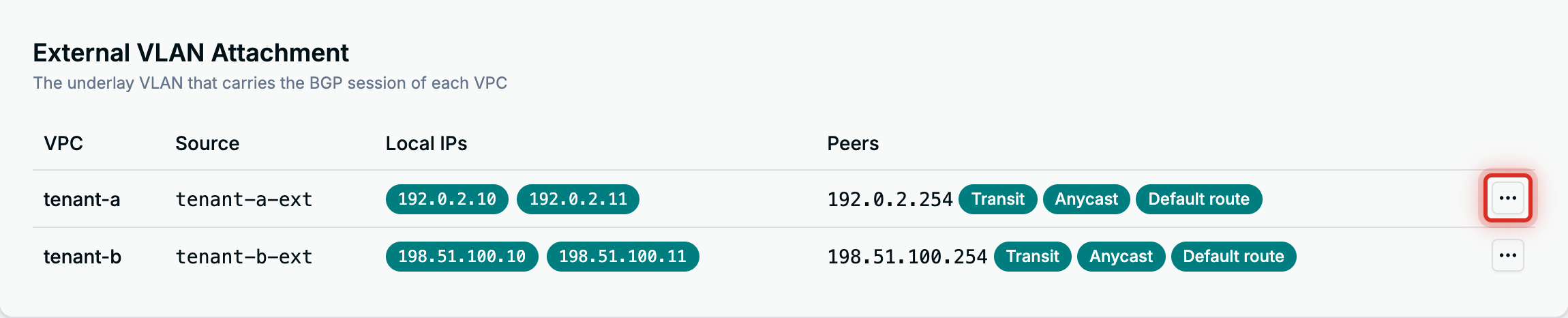
In bgp-per-vrf mode each VPC peers with the fabric over its own
underlay VLAN. External VLAN
Attachment, at the bottom of the VPC Attachment tab, lists each VPC’s VLAN source, the router’s
local addresses on it and its fabric peers. The menu at the end of a row, boxed in the screenshot because
it has no label, offers Edit, or Attach for a VPC without a VLAN yet, and Remove attachment
when the router’s spec has an entry for the VPC.
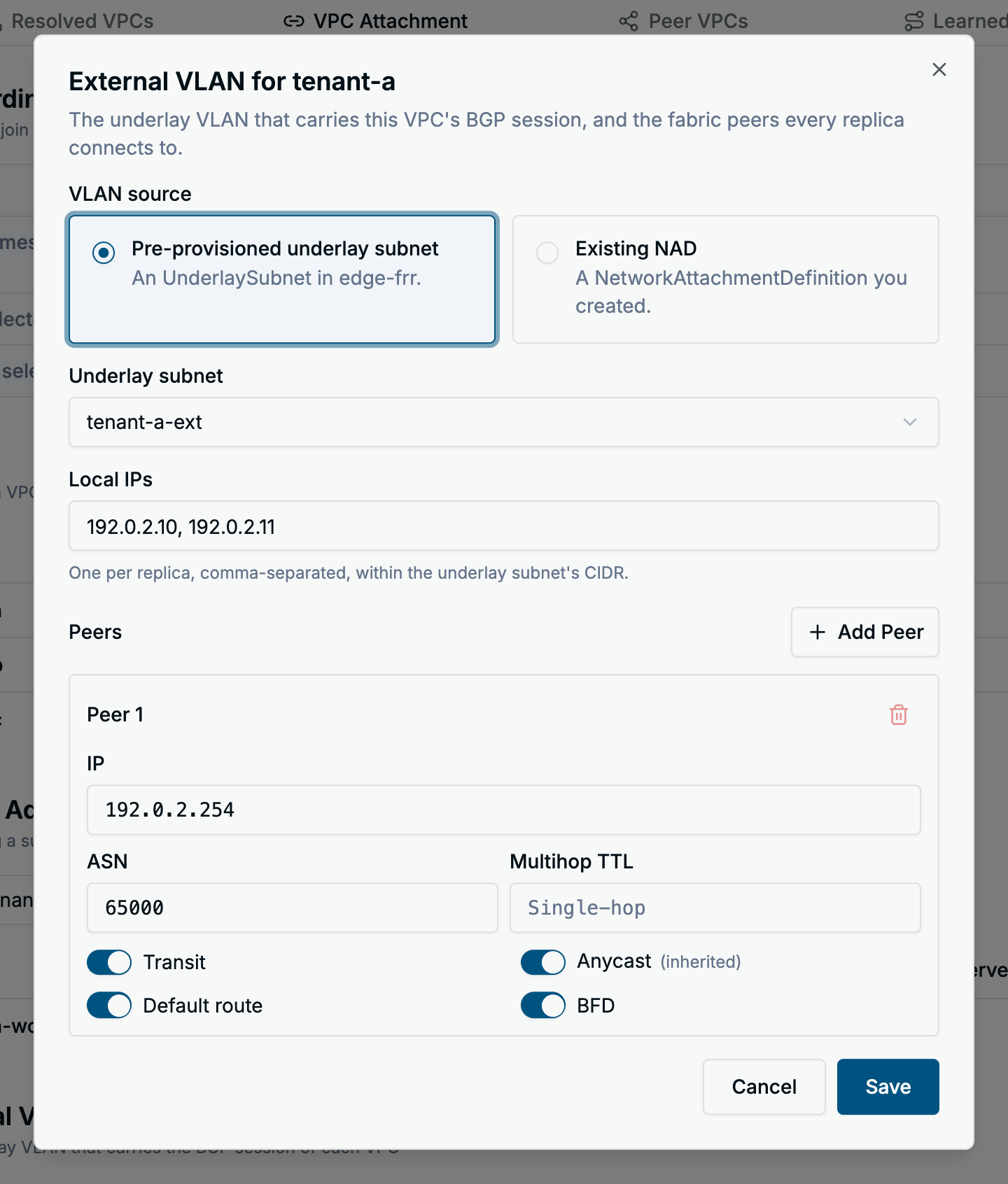
| Field | What to enter |
|---|---|
| VLAN source | A pre-provisioned underlay subnet in the router’s namespace, or the name of an existing NAD (NetworkAttachmentDefinition). |
| Local IPs | The router’s addresses on the VLAN, one per replica, inside the underlay subnet’s CIDR. |
| Peers | The fabric neighbours: IP, ASN (empty takes the router’s default peer ASN), multihop TTL, and the Transit, Anycast, Default route and BFD switches. Add Peer adds another neighbour. |
Save stays disabled until a source is chosen, every local IP is a distinct IPv4 address inside the underlay subnet’s CIDR, one per replica, and every peer has a distinct IPv4 address.
A VPC configured through annotations on the VPC object shows its values as inherited. Saving copies the inherited peers and local IPs into the router, so later annotation changes to those stop applying; a VLAN source left on From VPC annotation keeps following the annotation. Annotations on a VPC from another namespace are ignored, so its VLAN must be set here.
Save writes the entry into the router’s spec.perVRFTransit.vpcVLANs. Remove attachment deletes
the entry after a confirmation and tears the VPC’s session down, unless the VPC’s own annotations still
describe a VLAN, in which case the router falls back to them.
The same with kubectl
# in spec.perVRFTransit of the AZEdgeRouter
vpcVLANs:
  - vpc: tenant-a
    underlaySubnet: tenant-a-ext
    localIPs: ["192.0.2.10", "192.0.2.11"]
    peers:
      - ip: 192.0.2.254
        asn: 65000
        advertiseOVNSubnets: true
        defaultRoute: true
        bfd: true
kubectl -n edge-frr edit azedgerouter edge-router-a
What the dashboard does not do
Creating and deleting routers, and changing their ASN, replicas, peer routers, fabric peers in evpn
mode or in-VPC speaker settings, is kubectl work on the AZEdgeRouter object. The dashboard’s YAML
dialog shows the object but does not edit it.
Troubleshooting
Hover the status icon in the list, or read the router’s conditions. Besides Ready, the router reports
ReplicasSchedulable (why a replica stays Pending), ReplicaRedundancy (replicas sharing a node) and
ConfigValid (VPCs or settings the router rejected, such as a missing opt-in label); the dashboard shows
only Ready.
kubectl -n edge-frr get azedgerouter edge-router-a \
  -o jsonpath='{range .status.conditions[*]}{.type}={.status} {.reason}: {.message}{"\n"}{end}'
The reason tells you where to look.
| Reason or symptom | What to do |
|---|---|
ManagementSubnetUnavailable | The subnet named in spec.managementSubnet could not be read in the router’s namespace, usually a missing subnet or a wrong name; nothing else ran. The message has the error. |
TaskFailed | A reconcile step failed; the message names it. kubectl describe the router for the matching event. |
WaitingForTransitSubnets | A newly attached VPC’s transit subnet is still being created; the message and a Warning event name it. If it stays, check that subnet, and that spec.transitSubnet.cidr does not overlap kube-ovn’s join subnet (100.64.0.0/16) and has room for every VPC. |
PodsNotReady | No FRR replica is ready. Look at the router’s pods in its namespace: kubectl -n <namespace> get pods -l app.kubernetes.io/instance=<router>. Replicas stay Pending when fewer nodes match spec.nodeSelector than there are replicas, since replicas never share a node unless spec.allowColocatedReplicas is set; ReplicasSchedulable carries the scheduler’s reason. |
StatefulSetUnavailable | The router’s StatefulSet cannot be read. Usually brief; if it persists, check the controller’s logs. |
| Ready, but fewer ready replicas than configured | Traffic flows through the ready replicas. Find the missing pod as for PodsNotReady. |
| A fabric peer’s session is not Established | Check the peer’s IP and ASN, the VLAN and the matching VRF on the upstream router. Prefixes stays 0 / 0 until the session is up. A session that stays in Active or Connect cannot reach the peer. |
no session for one replica, or 1 of 2 replicas reports no sessions under the table | That replica has no BGP session with the peer. Check whether the replica’s pod runs and has the VLAN interface. |
| A VPC stays Pending on the VPC Attachment tab | The router has not resolved it. Wait for the next reconcile, then check the Ready condition. |
| A VPC is attached but has no fabric session | Its external VLAN could not be set up. The reason is in status.resolvedAZVPCs[].externalVLANError of the router, which the dashboard does not show: an incomplete VLAN annotation (nad-name, peer-ip and local-ips go together), a number of local IPs that differs from the replica count, zone-scoped annotations on a router without spec.zone, or a peer list that resolves to no peer. When the field is empty, check that the underlay subnet exists in the router’s namespace and is Ready; the router waits for it without an error. |
| Labelled … for another router on the attach switch | The VPC carries the selector label with another router’s value. Detach it from that router first. |
The router is busy with other changes. Try again. after Save | The router kept changing during the save, usually status updates; the dashboard retried twice and kept your edit. Save again. |
The attachment for <vpc> changed and was reloaded. after Save | Someone else changed this VPC’s VLAN entry meanwhile. The dialog shows the new values; reapply your changes. |