KubeLB provides Web Application Firewall (WAF) capabilities using the Coraza WASM filter. It inspects Layer 7 HTTP traffic at the Envoy Proxy level and blocks malicious requests, such as SQL injection, XSS, and command injection, using the OWASP Core Rule Set (CRS). No application code changes are required; protection is applied at the infrastructure level.
WAF is a beta feature available in Enterprise Edition only. Suitable for non-critical production workloads; observe WAF metrics (see Monitoring) before rolling out broadly.
Unlike a WAF deployed per cluster, KubeLB manages WAF policies for the whole fleet from the management cluster: platform operators apply policies globally, per tenant, or per route, and application teams can still opt individual services in or out.
Prerequisites
- KubeLB Enterprise Edition.
- Gateway API support enabled in the manager (
kubelb.enableGatewayAPI: true). WAF applies to Layer 7 Gateway API routes (HTTPRoute,GRPCRoute) served by Envoy Proxy.
Supported routes
| Resource or route type | Supported |
|---|---|
| HTTPRoute | Yes |
| GRPCRoute | Yes |
| LoadBalancer (Layer 4) | No |
| TCPRoute / UDPRoute / TLSRoute | No |
WAF operates at Layer 7 only and bypasses Layer 4 traffic.
Enable WAF
WAF was introduced as Alpha in KubeLB v1.3 and promoted to Beta in v1.4. It remains disabled by default; set kubelb.enableWAF: true in values.yaml to turn it on. The flag is expected to be removed when WAF reaches GA, with WAF enabled by default at that point.
kubelb:
  enableWAF: true
Demonstration
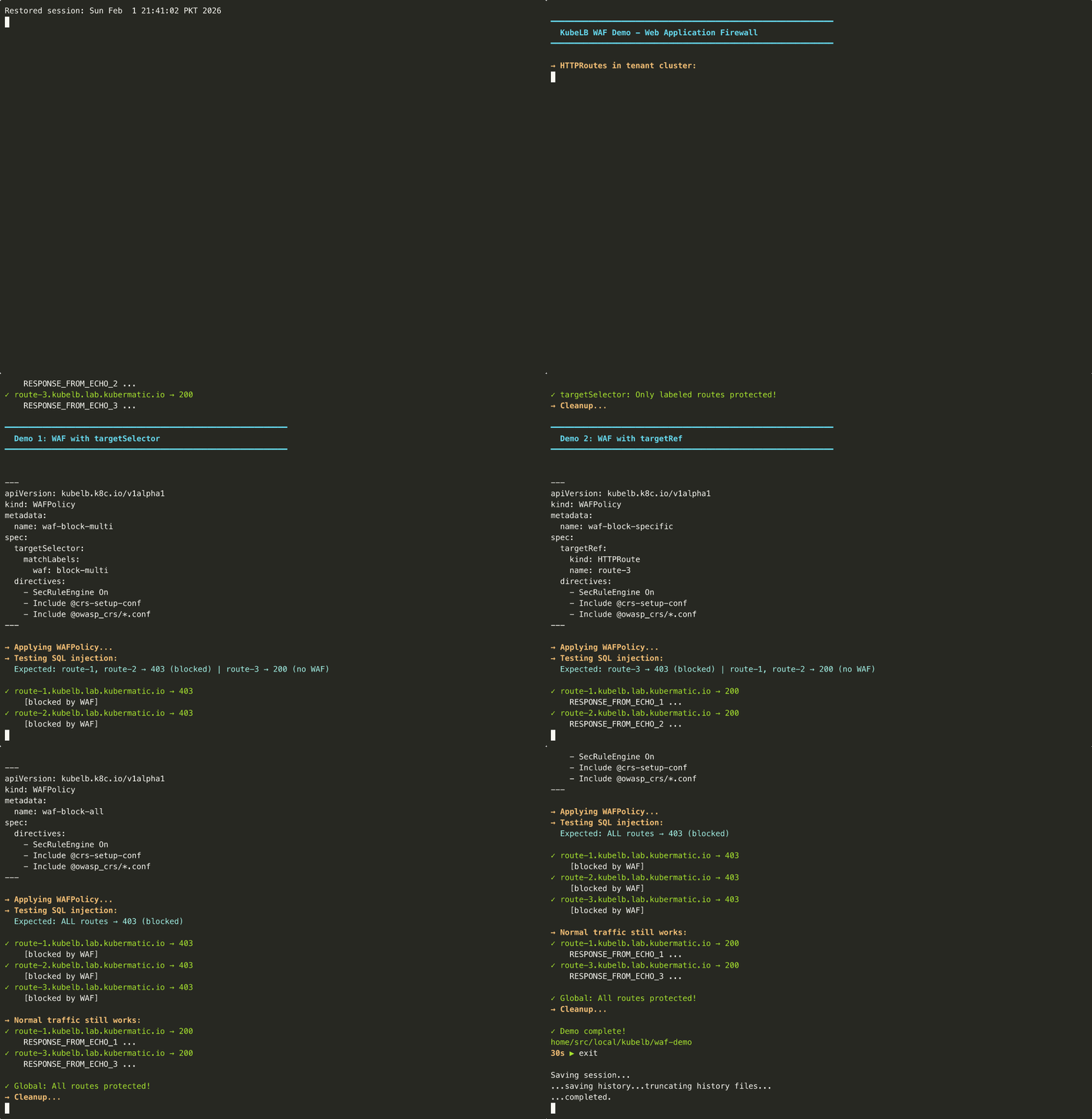
WAFPolicy CRD
Manage fleet-wide WAF policies with the cluster-scoped WAFPolicy CRD:
apiVersion: kubelb.k8c.io/v1alpha1
kind: WAFPolicy
metadata:
  name: global-waf
spec:
  global: true
  directives:
    - "SecRuleEngine On"
    - "SecRequestBodyAccess On"
    - "SecRequestBodyLimit 13107200"
    - "Include @crs-setup-conf"
    - "Include @owasp_crs/*.conf"
Targeting
Each WAFPolicy uses one of three mutually exclusive targeting modes:
targetRef: Target a specific route by name/namespace/kindtargetSelector: Match routes by label selector (checks both Route CR labels and embedded source route labels; Route CR labels win on conflict)global: true: Apply to all Layer 7 routes for all tenants
Policies without any targeting (global, targetRef, or targetSelector) are ignored.
In terms of precedence, targetRef has higher precedence than targetSelector, which has higher precedence than global. Within the same precedence level: oldest policy wins (by creationTimestamp). Equal timestamps: alphabetically-first name wins.
Default Directives
When directives is empty or omitted, OWASP CRS defaults are applied:
SecRuleEngine On
SecRequestBodyAccess On
SecRequestBodyLimit 13107200
Include @crs-setup-conf
Include @owasp_crs/*.conf
This enables full OWASP CRS in blocking mode with a 12.5MB request body limit.
Application Developers Enabling WAF for Applications
Platform administrators can pre-create WAFPolicy resources with targetSelector matching specific labels, making WAF protection available to application developers without granting them direct access to WAF policies.
Application developers enable WAF protection for their routes by adding the matching label to their HTTPRoute or GRPCRoute resources.
Example workflow:
- Admin creates a WAFPolicy with label-based targeting in management cluster:
apiVersion: kubelb.k8c.io/v1alpha1
kind: WAFPolicy
metadata:
  name: standard-waf
spec:
  targetSelector:
    matchLabels:
      security.kubelb.io/waf: enabled
- Developer enables WAF by adding the label to their HTTPRoute in tenant cluster:
apiVersion: gateway.networking.k8s.io/v1
kind: HTTPRoute
metadata:
  name: my-app
  labels:
    security.kubelb.io/waf: enabled  # Enables WAF protection
spec:
  # ... route configuration
The WAF policy applies to any route with matching labels. Developers can opt in to protection without policy creation permissions.
Tenant-Managed WAF Policies
Everything above is authored by the platform operator in the management cluster. Tenants can also manage their own WAF rules directly from their cluster, with no access to the management cluster or to any admin policy.
A tenant creates a namespaced TenantWAFPolicy in their own cluster. KubeLB syncs it up, validates it, and applies it only to that tenant’s routes. Because it is bound to the tenant’s own namespace, a tenant policy can never reach another tenant or the cluster-wide baseline. The whole feature is opt-in and stays under the operator’s control: nothing tenant-authored takes effect unless you enable it.
Enable tenant policies
Turn it on globally in the Config CRD, then optionally tune or disable it per tenant. Tenant settings win over Config.
apiVersion: kubelb.k8c.io/v1alpha1
kind: Config
metadata:
  name: default
  namespace: kubelb
spec:
  waf:
    enableTenantPolicies: true    # off by default
    # Optional guardrails:
    # enforceFailureMode: Closed  # pin failureMode for every tenant policy
    # tenantPolicyLimit: 10       # max policies per tenant
    # maxDirectivesPerPolicy: 64
    # maxDirectiveLength: 1024
---
apiVersion: kubelb.k8c.io/v1alpha1
kind: Tenant
metadata:
  name: tenant-a
spec:
  waf:
    disableTenantPolicies: false  # opt this one tenant out
    limit: 5
Author a policy (tenant side)
In the tenant cluster, a developer creates a TenantWAFPolicy. It reads like a trimmed-down WAFPolicy: use targetRef or targetSelector to pick routes, or default: true to cover every route the tenant owns. There is no cluster-wide global for tenants by design.
apiVersion: kubelb.k8c.io/v1alpha1
kind: TenantWAFPolicy
metadata:
  name: my-waf
  namespace: my-app
spec:
  default: true
  directives:
    - "SecRuleEngine On"
    - "Include @crs-setup-conf"
    - "Include @owasp_crs/*.conf"
The policy’s status is mirrored back into the tenant cluster, so developers can see whether it was accepted, rejected, or gated off without ever looking at the management cluster.
Guardrails
Tenant input is untrusted, so directives run through a strict allowlist before they reach Envoy. Anything that reads files, fetches remote rules, writes logs, or spawns processes (SecRemoteRules, filesystem Include, SecAuditLog, exec, setenv, and similar directives) is rejected, and a tenant cannot remove or disable the operator’s rules. Request body limits and rule counts are capped by the Config values above. A policy that trips any of these checks is marked invalid and never applied; traffic keeps flowing under whatever admin policy is in place.
How admin and tenant policies combine
Admin and tenant policies are two independent layers. A route can pick up one of each, and when it does, both run as separate WAF engines chained back to back: admin first, tenant second. A request is blocked if either engine blocks it, so a tenant can only add protection on top of the operator’s baseline, never weaken it.
global · selector · targetRef"] --> AdminMatch["Resolve matching
admin policy"] TenantPolicy["TenantWAFPolicy
default · selector · targetRef"] --> TenantMatch["Validate guardrails
and resolve"] end subgraph traffic["Request path"] direction LR Request["Layer 7 request"] --> AdminEngine["Admin Coraza engine
when matched"] AdminEngine -->|"allow"| TenantEngine["Tenant Coraza engine
when matched"] TenantEngine -->|"allow"| Upstream["Upstream Service"] AdminEngine -->|"block"| Block["Blocked response"] TenantEngine -->|"block"| Block end AdminMatch -.->|"configure"| AdminEngine TenantMatch -.->|"configure"| TenantEngine
| Admin policy | Tenant policy | Result |
|---|---|---|
Matches the route (global, targetRef, or targetSelector) | None | Admin rules only |
| None | Matches the route | Tenant rules only, in the tenant’s namespace |
| Matches | Matches | Both enforced; blocked if either one matches |
| Blocks a request | Tries to turn its engine off | Still blocked by the admin engine |
| None | Set, but the operator hasn’t enabled tenant policies | Ignored, status TenantWAFDisabled |
| None | Uses a forbidden directive or exceeds a limit | Rejected, status TenantWAFInvalid / TenantWAFLimitExceeded |
| Targets tenant A’s route | Tenant B default: true | No effect on tenant A |
failureMode behaves exactly as it does for admin policies, and an operator can pin it for every tenant with enforceFailureMode on the Config or Tenant.
Examples
Basic WAF with OWASP CRS Defaults
Target a specific HTTPRoute with default OWASP rules:
apiVersion: kubelb.k8c.io/v1alpha1
kind: WAFPolicy
metadata:
  name: basic-waf
spec:
  targetRef:
    kind: HTTPRoute
    name: my-app
Global Default for All Layer 7 Routes
Apply WAF to every HTTPRoute and GRPCRoute using global: true:
apiVersion: kubelb.k8c.io/v1alpha1
kind: WAFPolicy
metadata:
  name: global-waf
spec:
  global: true
  directives:
    - "SecRuleEngine On"
    - "SecRequestBodyAccess On"
    - "SecRequestBodyLimit 13107200"
    - "Include @crs-setup-conf"
    - "Include @owasp_crs/*.conf"
Detection-Only Mode
Log malicious requests without blocking, which is useful for initial rollout:
apiVersion: kubelb.k8c.io/v1alpha1
kind: WAFPolicy
metadata:
  name: detect-only
spec:
  targetRef:
    kind: HTTPRoute
    name: my-app
  directives:
    - "SecRuleEngine DetectionOnly"
    - "SecRequestBodyAccess On"
    - "Include @crs-setup-conf"
    - "Include @owasp_crs/*.conf"
Label-Based Targeting for Multiple Tenants
Protect all routes belonging to a specific tenant:
apiVersion: kubelb.k8c.io/v1alpha1
kind: WAFPolicy
metadata:
  name: tenant-a-waf
spec:
  targetSelector:
    matchLabels:
      kubelb.k8c.io/tenant-name: tenant-a
  directives:
    - "SecRuleEngine On"
    - "SecRequestBodyAccess On"
    - "Include @crs-setup-conf"
    - "Include @owasp_crs/*.conf"
Or target multiple tenants with matchExpressions:
apiVersion: kubelb.k8c.io/v1alpha1
kind: WAFPolicy
metadata:
  name: multi-tenant-waf
spec:
  targetSelector:
    matchExpressions:
      - key: kubelb.k8c.io/tenant-name
        operator: In
        values: ["tenant-a", "tenant-b"]
GRPCRoute with Custom Rules
Apply custom SecLang rules to a gRPC service:
apiVersion: kubelb.k8c.io/v1alpha1
kind: WAFPolicy
metadata:
  name: grpc-waf
spec:
  targetRef:
    kind: GRPCRoute
    name: my-grpc-service
    namespace: tenant-name
  directives:
    - "SecRuleEngine On"
    - "SecRequestBodyAccess Off"
    - 'SecRule REQUEST_HEADERS "@detectSQLi" "id:900001,phase:1,deny,status:403,msg:SQLi in header"'
Global Settings for WAF
WAF behavior can be customized globally via the Config CRD under spec.waf:
apiVersion: kubelb.k8c.io/v1alpha1
kind: Config
metadata:
  name: default
  namespace: kubelb
spec:
  waf:
    # Custom WASM init container image for the Coraza binary
    # Defaults to KubeLB manager image which has the Coraza WASM binary embedded.
    wasmInitContainerImage: "registry.example.com/custom-coraza-wasm:v1"
    # Skip directive validation at reconciliation time
    skipValidation: false
The Coraza WASM binary is embedded in the KubeLB manager image by default. The init container copies it to a shared volume mounted read-only by Envoy at /etc/envoy/wasm. Only override wasmInitContainerImage if you need a custom build.
Policy Update Behavior
When you create, update, or delete a WAFPolicy, KubeLB propagates the configuration to Envoy immediately. However, how quickly these changes affect live traffic depends on HTTP connection lifecycle.
| Connection State | Behavior |
|---|---|
| New connections | Use updated WAF configuration immediately |
| Existing connections | Continue using previous configuration until connection closes |
HTTP/2 and keep-alive connections are reused for multiple requests. These connections close naturally after an idle timeout (default: 60 seconds), at which point subsequent requests use the updated configuration.
During the brief window after a policy change, requests arriving over existing connections may be processed with the previous WAF rules while new connections use the updated rules. This is standard Envoy behavior and not a security concern: existing connections continue enforcing their original WAF policy until they close.
Testing tip: When validating WAF policy changes in development, force each request to open a new connection:
curl -H "Connection: close" https://your-app.example.com/test
This ensures every request uses the latest WAF configuration, useful for verifying policy changes take effect.
Monitoring
| Metric | Type | Labels | Description |
|---|---|---|---|
kubelb_manager_waf_policies | Gauge | namespace, status | Count of valid/invalid policies |
kubelb_manager_waf_routes_protected | Gauge | namespace | Routes with active WAF protection |
kubelb_manager_waf_routes_blocked | Gauge | namespace | Routes blocked due to fail-closed |
kubelb_manager_waf_filter_failures_total | Counter | namespace, failure_mode | WAF filter creation failures |
kubelb_manager_waf_policy_reconcile_total | Counter | name, result | Policy reconciliation attempts |
kubelb_manager_waf_policy_reconcile_duration_seconds | Histogram | name | Reconciliation duration |