Tunneling exposes applications running on local workstations or VMs over the internet without firewall, NAT, DNS, or certificate configuration. KubeLB CLI exposes the workload over a secure tunnel with TLS certificates and a DNS record.
Tunnels are reusable and have a dedicated API type in KubeLB, Tunnel. Once created, a tunnel is registered with the KubeLB management cluster and can be connected to with the kubelb tunnel connect command.
Tunnels
Tunnel Configuration
To enable tunneling, configure the KubeLB management cluster to expose the connection management API. The API can be exposed through either an HTTPRoute (tunnel.connectionManager.httpRoute) or an Ingress (tunnel.connectionManager.ingress); Gateway API is preferred. In the example below, replace connection-manager.example.com with the domain the connection manager should be reachable at, *.apps.example.com with the wildcard domain used for tunnel hostnames, and the cert-manager.io/cluster-issuer annotation with your issuer:
kubelb:
  enableGatewayAPI: true
  debug: true
  envoyProxy:
    # -- Topology defines the deployment topology for Envoy Proxy. Only `shared` is supported in v1.4.
    topology: shared
    # -- The number of replicas for the Envoy Proxy deployment.
    replicas: 1
  # -- Propagate all annotations from the LB resource to the LB service.
  propagateAllAnnotations: true

  # Tunnel configuration
  tunnel:
    enabled: true
    connectionManager:
      httpRoute:
        enabled: true
        domain: "connection-manager.example.com"
        gatewayName: "default"
        gatewayNamespace: "kubelb"
        annotations:
          external-dns.alpha.kubernetes.io/hostname: "*.apps.example.com,connection-manager.example.com"
          external-dns.alpha.kubernetes.io/ttl: "300"
          cert-manager.io/cluster-issuer: "letsencrypt-production-dns"
      ingress:
        enabled: false
        className: "nginx"
        annotations:
          cert-manager.io/cluster-issuer: "letsencrypt-production-dns"
          nginx.ingress.kubernetes.io/proxy-read-timeout: "3600"
          nginx.ingress.kubernetes.io/proxy-send-timeout: "3600"
          external-dns.alpha.kubernetes.io/hostname: connection-manager-ingress.example.com
          external-dns.alpha.kubernetes.io/ttl: "10"
          nginx.ingress.kubernetes.io/backend-protocol: "HTTP"
        hosts:
          - host: connection-manager-ingress.example.com
            paths:
              - path: /tunnel
                pathType: Prefix
              - path: /health
                pathType: Prefix
        tls:
          - secretName: connection-manager-tls
            hosts:
              - connection-manager-ingress.example.com
Then configure the connection manager URL at the Config or Tenant level:
apiVersion: kubelb.k8c.io/v1alpha1
kind: Config
metadata:
  name: default
  namespace: kubelb
spec:
  ingress:
    class: "nginx"
  gatewayAPI:
    class: "eg"
  loadBalancer:
    limit: 15
  certificates:
    defaultClusterIssuer: letsencrypt-staging-dns
  tunnel:
    connectionManagerURL: "https://connection-manager.example.com"
The Gateway or Ingress must also be configured to manage DNS for the tunnel. See the DNS documentation.
Provisioning Tunnels
Tunnels are created either using the kubelb expose 1313 command or the kubelb tunnel create command.
kubelb expose 1313
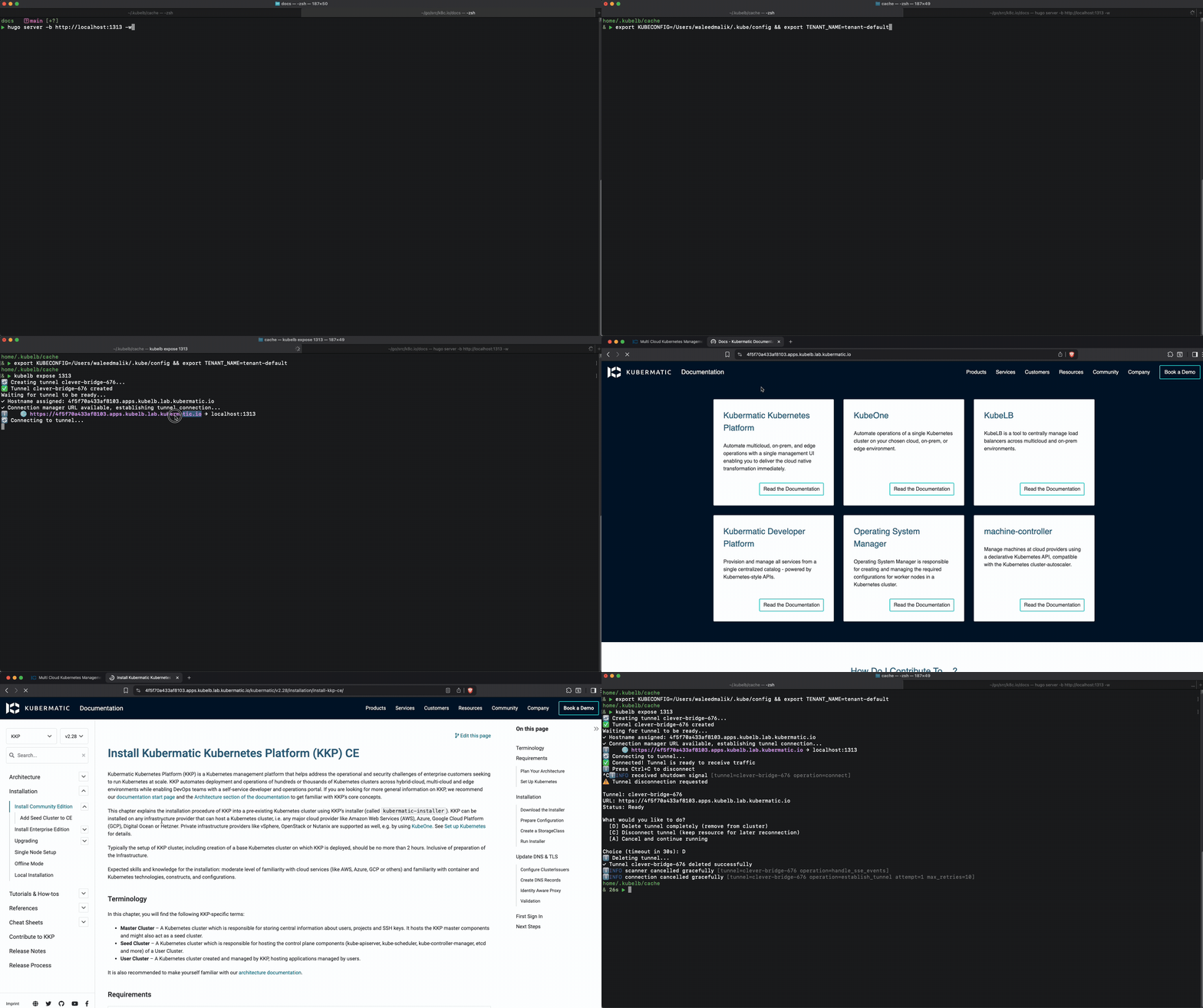
This creates a tunnel with a generated hostname and forwards traffic to port 1313 on the local machine. The ingress point for this traffic is KubeLB’s management cluster, so the traffic is encrypted.
Alternatively, create a tunnel with the kubelb tunnel create command:
kubelb tunnel create my-app --port 1313
This creates a tunnel with a generated hostname that can be connected to later.
kubelb tunnel connect my-app --port 1313
This will connect to the tunnel and forward traffic to the port 1313 on the local machine.
Tunnel Hostnames
When the tenant has dns.allowExplicitHostnames: false (see DNS), a Tunnel with spec.hostname set is rejected with no hostname configurable. Request a generated hostname under the tenant’s wildcard domain instead by annotating the Tunnel with kubelb.k8c.io/request-wildcard-domain: "true" — the same annotation used on LoadBalancer resources.
For deleting, inspecting, and listing tunnels, see the Tunnel API documentation.