KubeLB provides Web Application Firewall (WAF) capabilities using the Coraza WASM filter. It inspects Layer 7 HTTP traffic at the Envoy Proxy level and blocks malicious requests using OWASP Core Rule Set (CRS) — protecting against SQL injection, XSS, and other injection attacks without application changes.
WAF is currently an alpha feature available in Enterprise Edition only. It is not recommended for production use.
Why WAF?
- SQL injection, XSS, and command injection attacks blocked at the gateway before reaching backends
- OWASP CRS provides battle-tested rule sets out of the box
- No application code changes required — protection applied at infrastructure level
- Per-route or global policies with label-based multi-tenant targeting
WAF with KubeLB vs. Other Self-Hosted Solutions
KubeLB centralizes WAF policy management across your entire fleet of clusters from a single control plane. Apply policies globally, per-tenant, or to specific routes, giving you granular control over security posture without touching application code.
This infrastructure-first approach shifts WAF management from developers to Platform Operators and Infrastructure Engineers, who can now secure entire fleets with consistent policies. Application teams retain the flexibility to enable WAF protection for their services, creating a clear separation of concerns while maintaining operational agility.
Supported Routes
| Route Type | Supported |
|---|---|
| HTTPRoute | Yes |
| GRPCRoute | Yes |
| LoadBalancer (Layer 4) | No |
| TCPRoute / UDPRoute / TLSRoute | No |
WAF operates at Layer 7 only and bypasses Layer 4 traffic.
Enable WAF
WAF has been introduced as an Alpha feature in KubeLB v1.3. Due to the nature/stage of the feature, it is disabled by default. To enable WAF, you need to set the kubelb.enableWAF flag to true in the values.yaml file.
In future, when the feature is promoted to Beta, the flag will be removed and WAF will be enabled by default.
kubelb:
  enableWAF: true
Demonstration
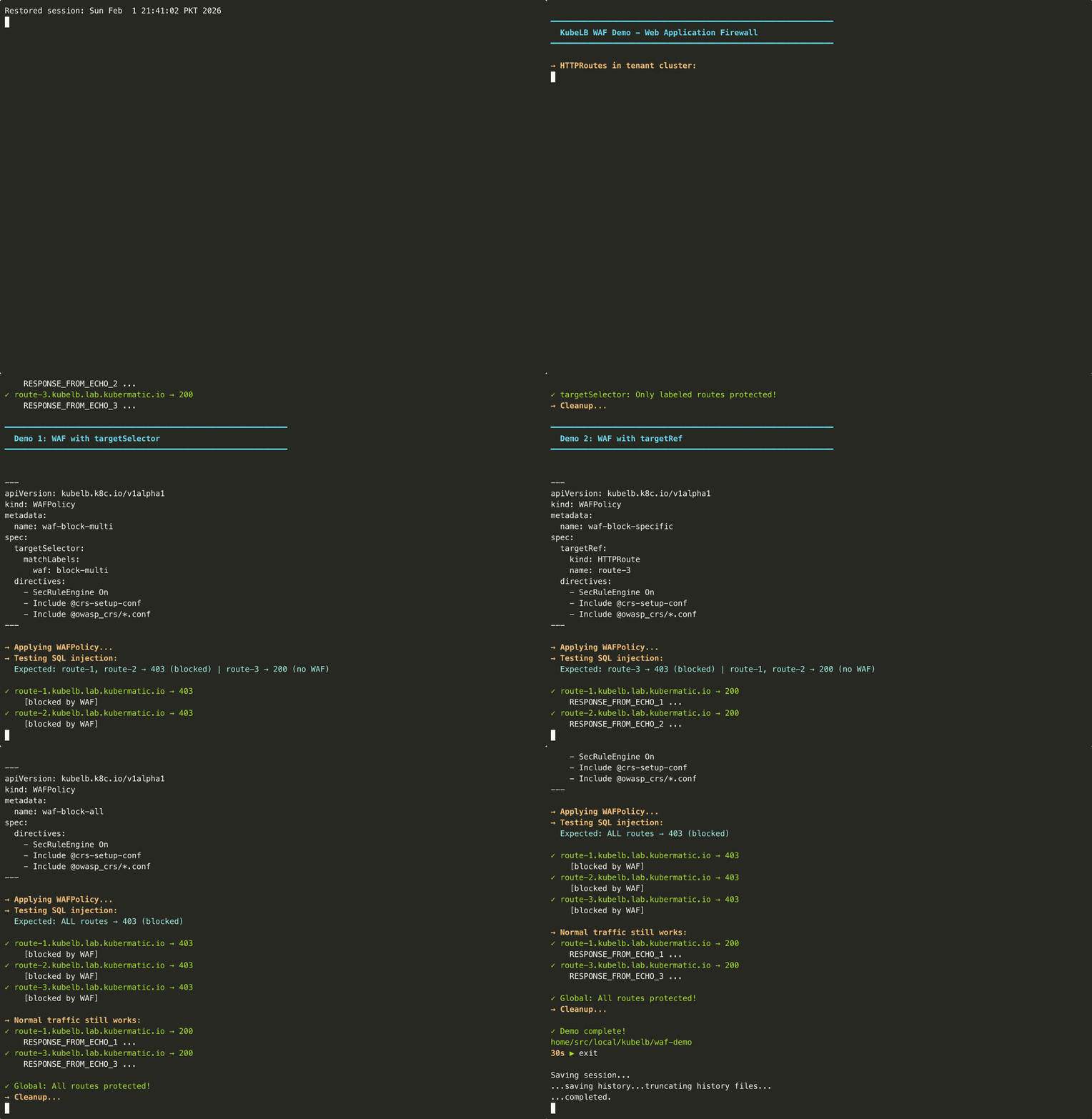
WAFPolicy CRD
To manage WAF policies, you can use the WAFPolicy CRD which is a cluster-scoped resource. The following is an example of a WAFPolicy CRD:
apiVersion: kubelb.k8c.io/v1alpha1
kind: WAFPolicy
metadata:
  name: global-waf
spec:
  global: true
  directives:
    - "SecRuleEngine On"
    - "SecRequestBodyAccess On"
    - "SecRequestBodyLimit 13107200"
    - "Include @crs-setup-conf"
    - "Include @owasp_crs/*.conf"
Targeting
Three mutually exclusive targeting modes:
targetRef— Target a specific route by name/namespace/kindtargetSelector— Match routes by label selector (checks both Route CR labels and embedded source route labels; Route CR labels win on conflict)global: true— Apply to ALL Layer 7 routes for ALL tenants
Policies without any targeting (global, targetRef, or targetSelector) are ignored.
In terms of precedence, targetRef has higher precedence than targetSelector, which has higher precedence than global. Within the same precedence level: oldest policy wins (by creationTimestamp). Equal timestamps: alphabetically-first name wins.
Default Directives
When directives is empty or omitted, OWASP CRS defaults are applied:
SecRuleEngine On
SecRequestBodyAccess On
SecRequestBodyLimit 13107200
Include @crs-setup-conf
Include @owasp_crs/*.conf
This enables full OWASP CRS in blocking mode with a 12.5MB request body limit.
Application Developers Enabling WAF for Applications
Platform administrators can pre-create WAFPolicy resources with targetSelector matching specific labels, making WAF protection available to application developers without granting them direct access to WAF policies.
Application developers can then enable WAF protection for their routes by simply adding the matching label to their HTTPRoute or GRPCRoute resources. This self-service approach maintains security boundaries while giving developers control over when to enable protection for their applications.
Example workflow:
- Admin creates a WAFPolicy with label-based targeting in management cluster:
apiVersion: kubelb.k8c.io/v1alpha1
kind: WAFPolicy
metadata:
  name: standard-waf
spec:
  targetSelector:
    matchLabels:
      security.kubelb.io/waf: enabled
- Developer enables WAF by adding the label to their HTTPRoute in tenant cluster:
apiVersion: gateway.networking.k8s.io/v1
kind: HTTPRoute
metadata:
  name: my-app
  labels:
    security.kubelb.io/waf: enabled  # Enables WAF protection
spec:
  # ... route configuration
The WAF policy automatically applies to any route with matching labels, enabling developers to opt-in to security protection without requiring policy creation permissions.
Examples
Basic WAF — OWASP CRS Defaults
Target a specific HTTPRoute with default OWASP rules:
apiVersion: kubelb.k8c.io/v1alpha1
kind: WAFPolicy
metadata:
  name: basic-waf
spec:
  targetRef:
    kind: HTTPRoute
    name: my-app
Global Default — All Layer 7 Routes
Apply WAF to every HTTPRoute and GRPCRoute using global: true:
apiVersion: kubelb.k8c.io/v1alpha1
kind: WAFPolicy
metadata:
  name: global-waf
spec:
  global: true
  directives:
    - "SecRuleEngine On"
    - "SecRequestBodyAccess On"
    - "SecRequestBodyLimit 13107200"
    - "Include @crs-setup-conf"
    - "Include @owasp_crs/*.conf"
Detection-Only Mode
Log malicious requests without blocking — useful for initial rollout:
apiVersion: kubelb.k8c.io/v1alpha1
kind: WAFPolicy
metadata:
  name: detect-only
spec:
  targetRef:
    kind: HTTPRoute
    name: my-app
  directives:
    - "SecRuleEngine DetectionOnly"
    - "SecRequestBodyAccess On"
    - "Include @crs-setup-conf"
    - "Include @owasp_crs/*.conf"
Label-Based Targeting — Multi-Tenant
Protect all routes belonging to a specific tenant:
apiVersion: kubelb.k8c.io/v1alpha1
kind: WAFPolicy
metadata:
  name: tenant-a-waf
spec:
  targetSelector:
    matchLabels:
      kubelb.k8c.io/tenant-name: tenant-a
  directives:
    - "SecRuleEngine On"
    - "SecRequestBodyAccess On"
    - "Include @crs-setup-conf"
    - "Include @owasp_crs/*.conf"
Or target multiple tenants with matchExpressions:
apiVersion: kubelb.k8c.io/v1alpha1
kind: WAFPolicy
metadata:
  name: multi-tenant-waf
spec:
  targetSelector:
    matchExpressions:
      - key: kubelb.k8c.io/tenant-name
        operator: In
        values: ["tenant-a", "tenant-b"]
GRPCRoute with Custom Rules
Apply custom SecLang rules to a gRPC service:
apiVersion: kubelb.k8c.io/v1alpha1
kind: WAFPolicy
metadata:
  name: grpc-waf
spec:
  targetRef:
    kind: GRPCRoute
    name: my-grpc-service
    namespace: tenant-name
  directives:
    - "SecRuleEngine On"
    - "SecRequestBodyAccess Off"
    - 'SecRule REQUEST_HEADERS "@detectSQLi" "id:900001,phase:1,deny,status:403,msg:SQLi in header"'
Global Settings for WAF
WAF behavior can be customized globally via the Config CRD under spec.waf:
apiVersion: kubelb.k8c.io/v1alpha1
kind: Config
metadata:
  name: default
  namespace: kubelb
spec:
  waf:
    # Custom WASM init container image for the Coraza binary
    # Defaults to KubeLB manager image which has the Coraza WASM binary embedded.
    wasmInitContainerImage: "registry.example.com/custom-coraza-wasm:v1"
    # Skip directive validation at reconciliation time
    skipValidation: false
The Coraza WASM binary is embedded in the KubeLB manager image by default. The init container copies it to a shared volume mounted read-only by Envoy at /etc/envoy/wasm. Only override wasmInitContainerImage if you need a custom build.
Policy Update Behavior
When you create, update, or delete a WAFPolicy, KubeLB propagates the configuration to Envoy immediately. However, how quickly these changes affect live traffic depends on HTTP connection lifecycle.
| Connection State | Behavior |
|---|---|
| New connections | Use updated WAF configuration immediately |
| Existing connections | Continue using previous configuration until connection closes |
HTTP/2 and keep-alive connections are reused for multiple requests. These connections close naturally after an idle timeout (default: 60 seconds), at which point subsequent requests use the updated configuration.
During the brief window after a policy change, requests arriving over existing connections may be processed with the previous WAF rules while new connections use the updated rules. This is standard Envoy behavior and not a security concern — existing connections continue enforcing their original WAF policy until they close.
Testing tip: When validating WAF policy changes in development, force each request to open a new connection:
curl -H "Connection: close" https://your-app.example.com/test
This ensures every request uses the latest WAF configuration, useful for verifying policy changes take effect.
Monitoring
| Metric | Type | Labels | Description |
|---|---|---|---|
kubelb_manager_waf_policies | Gauge | namespace, status | Count of valid/invalid policies |
kubelb_manager_waf_routes_protected | Gauge | namespace | Routes with active WAF protection |
kubelb_manager_waf_routes_blocked | Gauge | namespace | Routes blocked due to fail-closed |
kubelb_manager_waf_filter_failures_total | Counter | namespace, failure_mode | WAF filter creation failures |
kubelb_manager_waf_policy_reconcile_total | Counter | name, result | Policy reconciliation attempts |
kubelb_manager_waf_policy_reconcile_duration_seconds | Histogram | name | Reconciliation duration |