A Blueprint composes several already-published KDP services into a single new service,
publishable kind. Instead of asking platform users to create a PostgresInstance, a
Repository and an App separately and wire them together, a platform engineer authors one
Blueprint — for example a WebappStack or a pair of databases — publishes it to the service
catalog, and users then create a single object that fans out into all the composed children.
Blueprints are currently in beta. The API and user experience may change before general availability.
This guide is written for the Blueprint author (a platform engineer or service owner). For consuming a published Blueprint, see Consuming Blueprints.
Concepts
A Blueprint is authored as a BlueprintDefinition (blueprints.kdp.k8c.io/v1alpha1,
namespaced). Its core is a kro ResourceGraphDefinition (RGD) stored in
spec.resourceGraph, which describes:
- a schema — the synthesized kind’s own
spec/status(what consumers fill in), and - a list of resources — the child service objects to create, templated with CEL
references such as
${schema.spec.size}and cross-references between children.
The child kinds must be services that are already published and bound in the workspace where the Blueprint is authored (each child follows its own api-syncagent path to its service cluster — the Blueprint layer is invisible to the underlying services).
Lifecycle
A BlueprintDefinition moves through:
Draft → Validating → Valid | Invalid → Published → Deprecated
- Validation checks that every
(apiVersion, kind)in the graph resolves to a service available in the workspace (a kind that does not resolve almost always means the service is not bound), and that the RGD’s CEL expressions, field references and acyclicity are correct. - Publishing (
spec.published: true, whileValid) emits three artifacts into the same workspace: anAPIResourceSchema, anAPIExport, and aService(the catalog entry). The synthesized consumer kind is served under<kind>.blueprints.kdp.k8c.io. spec.deprecated: truemarks the Blueprint as deprecated. This is a hint surfaced by the KDP dashboard (which discourages creating new instances) — it is not enforced by the backend, so instances can still be created via the API. Existing instances keep working.
Authoring a BlueprintDefinition
The example below defines OrderApp Databases — a Blueprint that provisions two
PostgresInstance databases (a primary and a replica) that share a common storage size.
apiVersion: blueprints.kdp.k8c.io/v1alpha1
kind: BlueprintDefinition
metadata:
  name: database-orderapp
  namespace: default
spec:
  version: v0.1.0
  published: true
  deprecated: false
  # Mirrored onto the generated Service for the catalog / dashboard.
  catalogMetadata:
    title: OrderApp Databases
    category: Databases
    description: Provisions two PostgreSQL databases for the OrderApp, sharing a common storage size.
  # A kro ResourceGraphDefinition, stored verbatim.
  resourceGraph:
    apiVersion: kro.run/v1alpha1
    kind: ResourceGraphDefinition
    metadata:
      name: databaseorderapp
    spec:
      # The synthesized kind consumers will create.
      schema:
        apiVersion: v1alpha1
        kind: DatabaseOrderApp
        spec:
          name: string
          size: string
      # The composed child services.
      resources:
        - id: primary
          template:
            apiVersion: dbms.example.corp/v1alpha1
            kind: PostgresInstance
            metadata:
              name: ${schema.spec.name}-primary
            spec:
              parameters:
                storageSize: ${schema.spec.size}
              writeConnectionSecretToRef:
                name: ${schema.spec.name}-primary-conn
        - id: replica
          template:
            apiVersion: dbms.example.corp/v1alpha1
            kind: PostgresInstance
            metadata:
              name: ${schema.spec.name}-replica
            spec:
              parameters:
                storageSize: ${schema.spec.size}
              writeConnectionSecretToRef:
                name: ${schema.spec.name}-replica-conn
Apply it with kubectl apply -f in the workspace where the composed services are bound.
Once the object is Valid and published, the Blueprint appears in the service catalog as
just another service — the same entry, the same Add to Organization flow, the same
APIBinding. Consumers never have to know it is a composition: they enable it and create one
object, exactly as they would for a single service.
spec.version participates in the published schema’s identity. Bumping it publishes a new
version of the synthesized kind; toggling spec.published back to false stops instance
reconciliation but does not remove already-published artifacts.
Authoring in the dashboard
In the dashboard you author a Blueprint by editing its resource graph as YAML, helped by an AI assistant panel (see Building Blueprints with AI below) that drafts and edits that YAML for you. The dependencies between the composed services are shown as a read-only graph; you cannot build the graph by dragging nodes. Published Blueprints get a detail page with an Overview, the Description, and a Resource Graph you can inspect either as that read-only diagram or as the underlying RGD YAML.
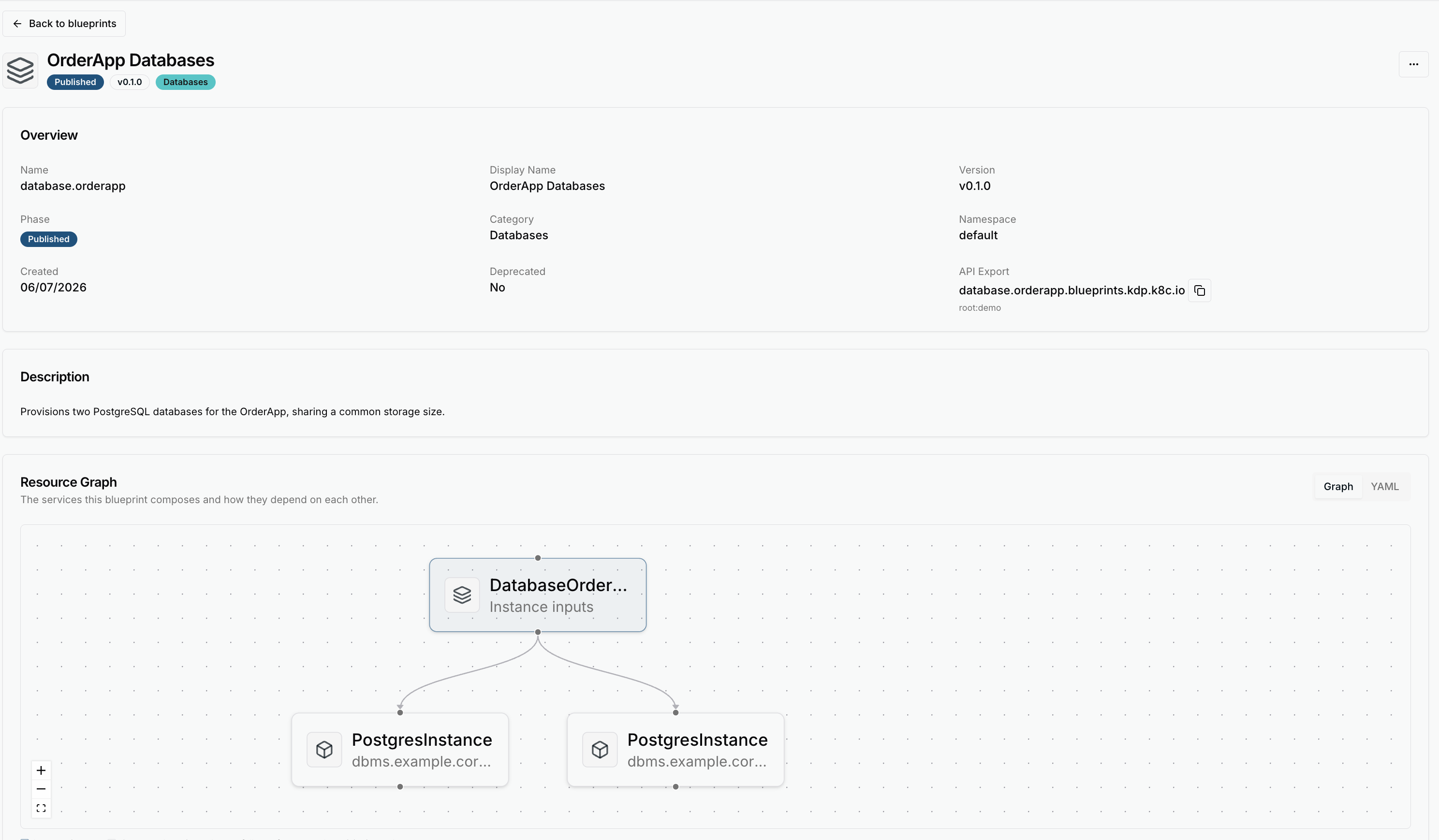
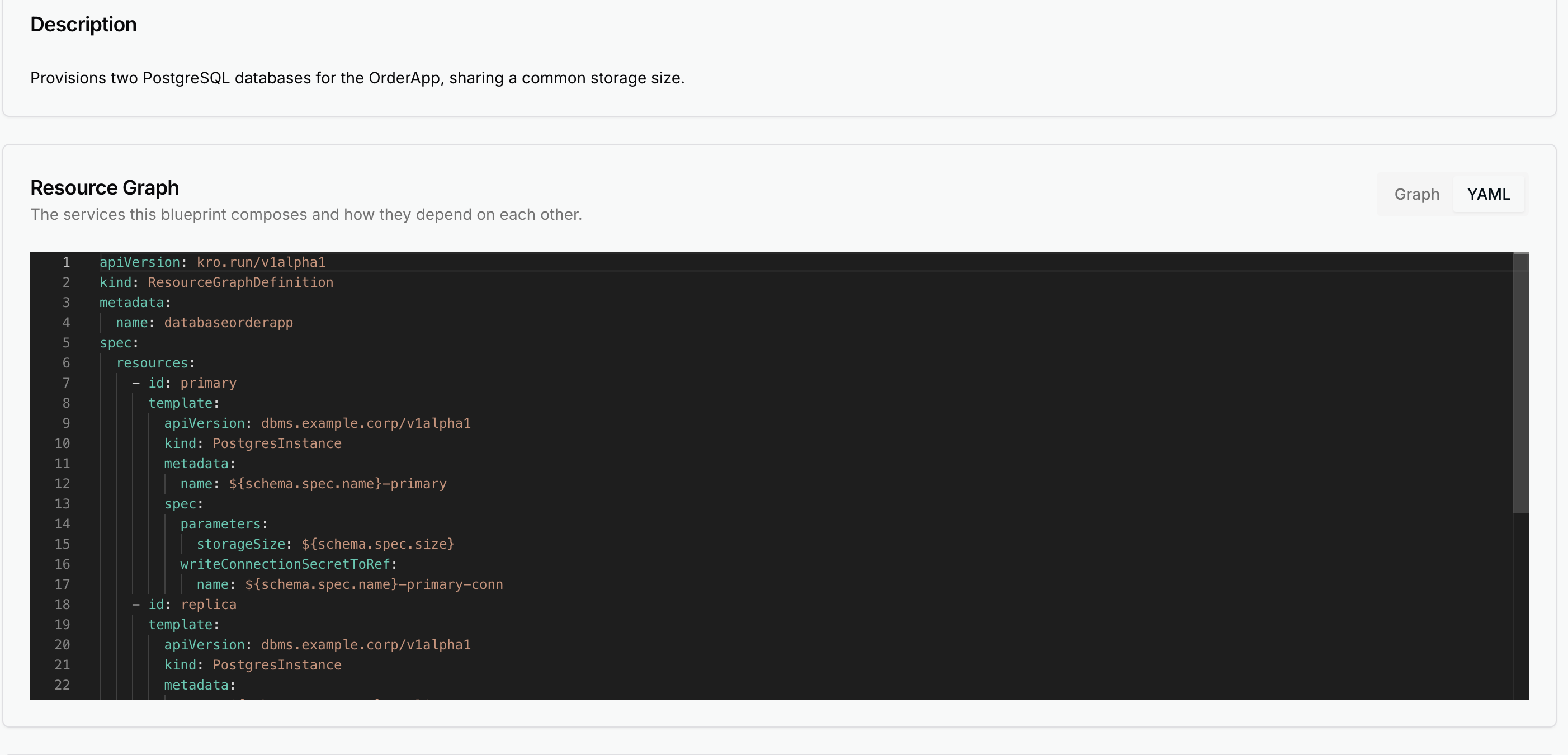
Switching the Resource Graph panel to YAML shows the kro ResourceGraphDefinition
backing the Blueprint:
Building Blueprints with AI
Writing a kro ResourceGraphDefinition by hand means knowing the exact kind, apiVersion,
fields and CEL wiring of every service you compose, plus kro’s SimpleSchema grammar for the
knobs you expose. The AI assistant in the dashboard’s Blueprint editor lets you describe the
outcome in plain language and drafts that YAML for you.
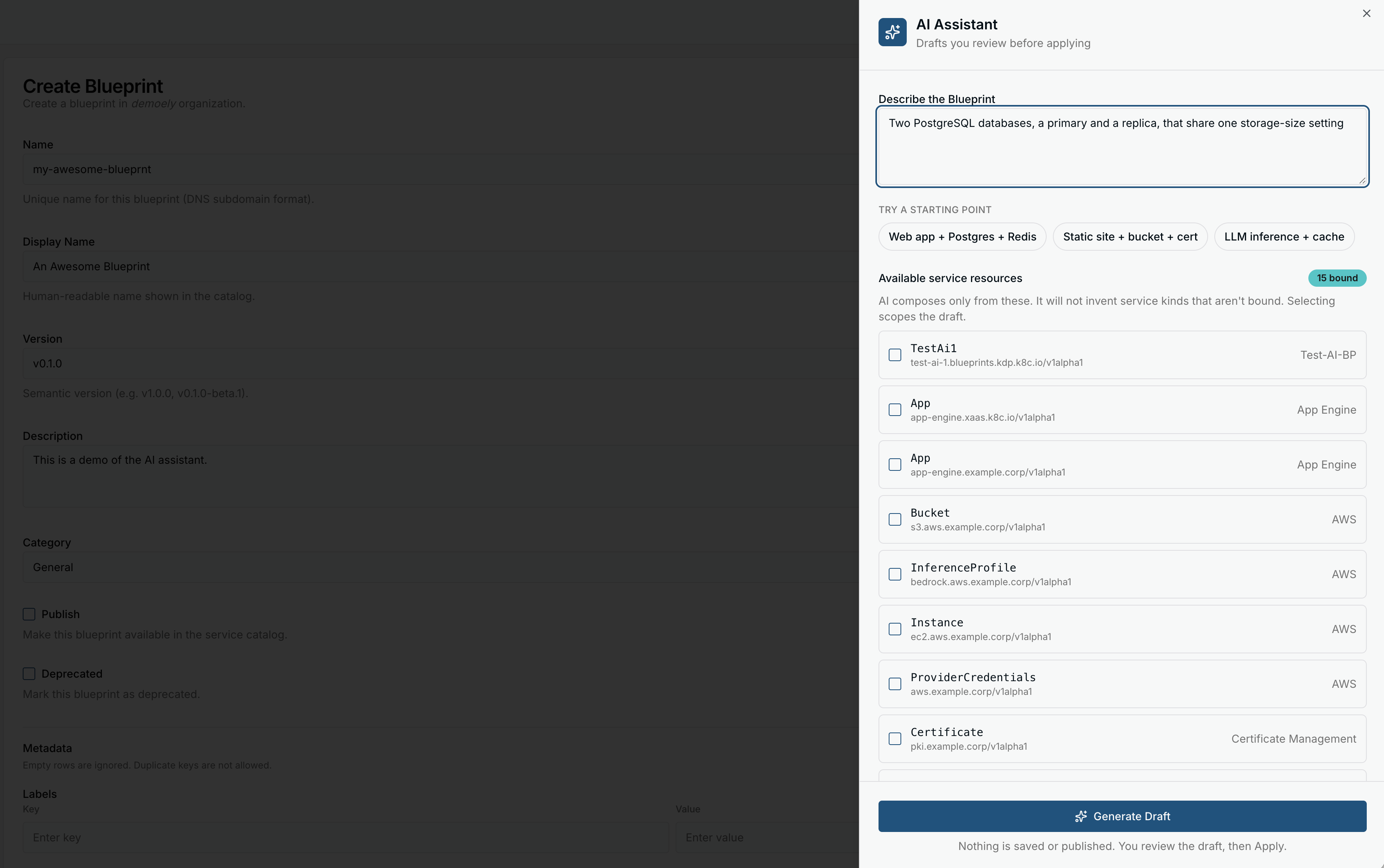
What it’s grounded in. The assistant is given the services currently bound in your
workspace as its only building blocks, each with its real schema. It composes only those
kinds, and this is enforced: if a draft references a kind that isn’t one of your bound services,
it is rejected rather than shown. This is the same constraint you would hit authoring by hand —
a Blueprint can only compose services that resolve in the workspace. Alongside the graph the
assistant also proposes catalog metadata (title, description, category) that pre-fills the
Blueprint’s catalogMetadata.
The assistant works in three modes:
| Mode | When | What it does |
|---|---|---|
| Create | Empty editor | Drafts a new resource graph from your description. |
| Edit | Existing graph | Applies your request as a minimal change, preserving unrelated resources and fields. |
| Fix with AI | Validation failed | Takes the current graph plus the controller’s validation errors and proposes a minimal repair, without redesigning the graph. |
Example. The prompt “Two PostgreSQL databases, a primary and a replica, that share one
storage-size setting” — against a workspace where a PostgresInstance service is bound —
drafts a graph with a size knob on the Blueprint’s own schema wired into both child
databases, much like the OrderApp Databases example above.
Review before publishing. The output is a draft loaded into the editor; nothing is
published automatically. It goes through exactly the same lifecycle as a hand-written graph
(Draft → Validating → Valid) before you set spec.published: true, and it is checked to be
structurally well-formed (valid kro spec, single-pipe SimpleSchema markers, resources limited
to your bound services) before it ever reaches the editor.
The assistant can make mistakes. The structural checks and Blueprint validation catch malformed or unresolvable graphs, but they do not know your intent — read the draft and confirm it composes the services you meant, with the field wiring and defaults you want, before publishing.
The AI assistant requires an OpenAI-compatible model configured by the operator on the dashboard
deployment (api.config.openaiKey and api.config.openaiModel). When it is not configured the
panel is unavailable and you author resource graphs manually. The same backend powers
the UI Builder.
Blueprint logos
A Blueprint can carry a logo for the catalog; the dashboard stores Blueprint logos in ConfigMaps. Set it through the dashboard’s Blueprint editor.
Service Catalog
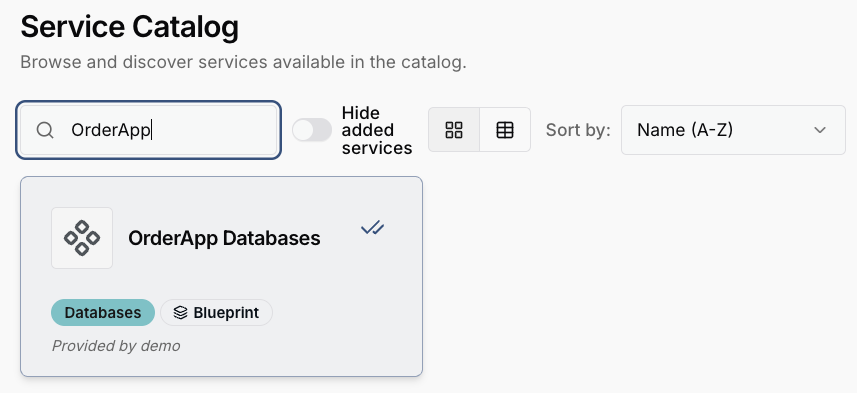
Publishing a Blueprint places it in the service catalog as a service. The generated
Service object is the catalog entry, and it sits next to the regular services: the same
card, the same search and category filters, the same Add to Organization button. The only
visible difference is a Blueprint badge marking the entry as a composition — everything
else a consumer does with it is ordinary service consumption.
The entry’s title, category and description come from the spec.catalogMetadata you set on the
BlueprintDefinition; the badge and the logo are added by the dashboard.
For the consumer’s side of this — enabling the entry and creating an instance — see Consuming Blueprints.
Related topics
- Consuming Blueprints — the platform-user side.
- Publishing Resources — how the composed services are published in the first place.
- Consuming Services — binding services (a prerequisite for composing them).
- UI Builder — the other AI-assisted authoring feature.